Static infrastructure fails dynamic applications. Provisioning for peaks wastes money, while provisioning for averages guarantees crashes during spikes. Kubernetes handles deployment, but resource management requires Horizontal Pod Autoscaling. It creates a responsive infrastructure where capacity mirrors demand.
Instead of guessing how many servers you need, you define performance rules, and the cluster adjusts the compute power in real-time. This shifts burden from manual intervention to architectural definition.
What Is HPA in Kubernetes?
HPA is a standard Kubernetes resource that automatically scales workloads. It adjusts the number of pod replicas in a Deployment or StatefulSet based on CPU utilization / custom metrics.
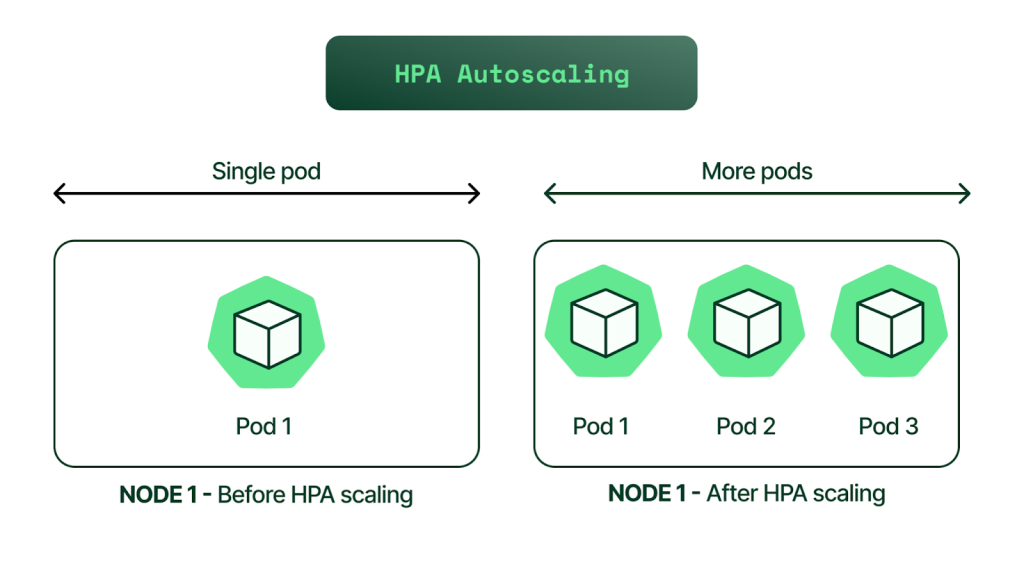
This concept relies on “scaling out” rather than “scaling up.” Unlike vertical scaling, which requires restarts and has hard limits, Horizontal pod autoscaling simply adds more identical pods. This is ideal for cloud-native apps, where stateless microservices can replicate infinitely to handle load.
How Horizontal Pod Autoscaling Works
The autoscaler uses a control loop that reacts to the present. Roughly every 15 seconds, the controller queries pod utilization and compares it against your defined target. If average CPU usage is 90% versus a 50% target, logic dictates doubling the replica count. It creates a responsive infrastructure where capacity mirrors demand. Controller updates the deployment, and the Kubernetes scheduler provisions the additional pods.
Key Components of Kubernetes HPA
This system relies on three distinct components talking to each other. If one breaks, the autoscaling stops.
- HPA Controller: The software brain that runs the calculation loop.
- Metrics Server: This is the aggregator. The controller cannot query pods directly. It relies on the Metrics Server to scrape resource usage from the Kubelet on every node. Without a functional Metrics Server, kubernetes HPA is blind.
- Scale Target: The resource being managed. This is usually a Deployment but can be any resource that supports the scale subresource.
Metrics Used by HPA (CPU, Memory, Custom Metrics)
Most engineers start with CPU scaling, but complex applications need more.
- Resource Metrics: CPU and Memory are built-in. CPU is safe as it throttles under load. Memory is risky; hitting limits triggers OOMKills, often causing crash loops.
- Custom Metrics: CPU is a lagging indicator. HPA can scale based on throughput (requests per second) using adapters, handling load before CPU spikes.
- External Metrics: Triggers can exist outside the cluster. You might scale based on AWS SQS queue depth, adding workers when queues fill.
Benefits of Using HPA in Kubernetes Clusters
Adopting an autoscaling strategy changes the operational reality of a platform team.
The primary benefit is cost optimization. HPA kubernetes setups ensure you only pay for the compute you use. At 3 AM, your application might run on two pods. At 3 PM, it might run on fifty. You do not pay for the overhead of fifty pods all day.
Availability is the second major factor. Traffic spikes are unpredictable. A human operator cannot react fast enough to a viral event or a DDoS attack. The autoscaler detects the trend and provisions resources immediately, preventing cascading failures and service outages.
Common Use Cases for Horizontal Pod Autoscaling
Not every application fits this model. Stateful applications like databases are notoriously difficult to scale horizontally because of data consistency and locking issues.
Horizontal pod autoscaling works best for stateless microservices. Frontend web servers, REST APIs, and gRPC services are ideal candidates. They process a request and forget it, meaning you can add or remove copies without breaking user sessions. Background worker pools are another strong use case. If you have a service that processes images or sends emails, HPA can expand the pool when the backlog grows and shrink it when the work is done.
How to Configure HPA in Kubernetes (Step-by-Step)
You configure the autoscaler using the autoscaling/v2 API. The most critical prerequisite is that your pods must have resource requests defined in their manifest. The HPA calculates usage as a percentage of the requested resource, not the limit.
A standard configuration looks like this:
apiVersion: autoscaling/v2kind: HorizontalPodAutoscalermetadata: name: backend-hpaspec: scaleTargetRef: apiVersion: apps/v1 kind: Deployment name: backend-service minReplicas: 3 maxReplicas: 15 metrics: - type: Resource resource: name: cpu target: type: Utilization averageUtilization: 75This tells hpa in kubernetes to maintain an average CPU utilization of 75%. It sets a floor of 3 replicas to ensure high availability and a ceiling of 15 to prevent run-away costs.
Best Practices for Effective Autoscaling
Default settings rarely suffice for production.
First, set accurate resource requests. Requests set too low waste money; too high risk downtime. Profile to find the baseline. Second, implement stabilization windows to handle metric jitter. Configure a scaleDown window to delay pod removal after traffic drops, preventing rapid “thrashing” of resources.
Limitations and Challenges of HPA
HPA is reactive. It has to see the fire before it calls the fire department. If your application takes three minutes to boot (common with heavy Java frameworks), the new pods might arrive too late to handle a sudden spike.
There is also a delay in the data pipeline. It takes time for the Kubelet to report stats, the Metrics Server to scrape them, and the HPA controller to read them. You are always making decisions based on data that is a minute or two old.
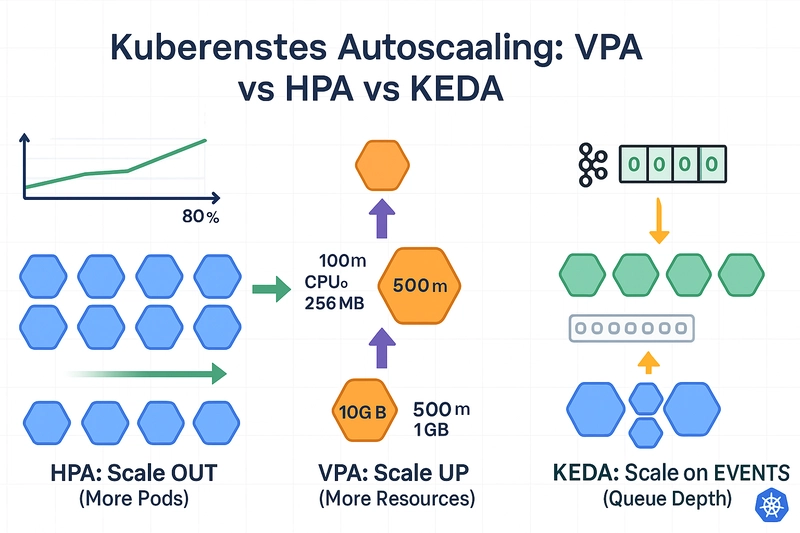
HPA vs VPA vs KEDA: Choosing the Right Autoscaling Method
You have other options depending on your architecture.
- HPA: The default for standard web traffic and stateless apps.
- VPA (Vertical): Useful for monolithic legacy apps that cannot run multiple instances. It restarts the pod with more resources.
- KEDA: The industry standard for event-driven scaling. If you need to scale based on Kafka lag, database queries, or Cron schedules, KEDA extends HPA in kubernetes to handle these complex triggers natively.
(Credits)
Conclusion
Automated scaling is the difference between a platform that requires a pager and one that manages itself. Using it, you can ensure that your infrastructure is as elastic as the cloud promises to balance performance and cost without human intervention.