Modern applications, especially those that rely heavily on relational databases, must efficiently handle large volumes of read and write operations. Opening a new database connection for every request is expensive, slow, and resource-intensive. This is where connection pooling comes into the picture.
Connection pooling is a performance optimization technique that allows applications to reuse existing database connections rather than creating new ones each time. In Java-based systems, whether using JDBC, Spring Boot, Hibernate, or standalone applications, connection pooling is considered a best practice for scalability and performance.
This article explains what connection pooling is, why it matters, how it works behind the scenes, and how to implement a connection pool in Java using libraries like HikariCP, C3P0, and Apache DBCP. We also cover best practices, common pitfalls, and configuration tips.
What Is Connection Pooling?
Connection pooling is a mechanism that maintains a cache (pool) of reusable database connections. Instead of creating a new database connection for each operation, applications borrow a connection from the pool and return it after use.
Why is creating a DB connection expensive?
Each new database connection typically involves:
- Network round-trip
- Authentication and authorization
- Allocation of database-side resources
- Protocol setup
This can take anywhere from 10–500 milliseconds, depending on the database and network environment.
Connection pooling eliminates this overhead by reusing already established connections, resulting in:
- Faster database operations
- Higher throughput
- More efficient resource utilization
How Connection Pools Work Behind the Scenes
A connection pool operates as an intermediary manager between the application and the database. Behind the scenes, each channel has a single subchannel. Each subchannel has an HTTP2 connection that uses TCP to convert requests to bytes and send them through the middleware and then to your table.
Lifecycle of a database connection in a pool
- Pool Initialization: When the application starts, a predefined number of connections are opened and stored.
- Application Requests a Connection: The pool provides an existing available connection.
- Application Executes its Query: The connection behaves just like a normal JDBC connection.
- Connection Returned to the Pool: Instead of closing the connection, the application returns it to the pool.
- Pool Manages Idle and Active Connections: It handles timeouts, eviction of bad connections, and creation of new ones if required.
Key operations performed by a connection pool
- Min/max connection management
- Idle connection checking
- Connection validation before reuse
- Slow/leaked connection detection
- Timeout management
A well-designed connection pool ensures both performance and database stability.
Also Read: How Supabase Data APIs Transform Backend Development and Reduce Complexity
Benefits of Using Connection Pooling in Applications
By using connection pools, development chores for data access are reduced, and connection management overhead is reduced. Resources are needed to establish, maintain, and release a connection to a backend store (such as a database) each time an application tries to access it. Implementing connection pooling brings some more several advantages:
1. Reduced Latency and Faster Performance
Opening a connection from scratch is slow. Connection pooling ensures near-instant access to ready connections.
2. Improved Application Scalability
A pool can handle many concurrent requests efficiently without overwhelming the database.
3. Efficient Resource Usage
Pools enforce limits on:
- Max active connections
- Idle connections
- Wait time
This prevents connection storms and database overload.
4. Better Stability and Reliability
Connection pools can automatically:
- Validate broken connections
- Remove stale or timed-out connections
- Recreate connections when needed
5. Works Seamlessly with Frameworks
Spring Boot, Hibernate, and Java EE containers automatically integrate with popular pool implementations.
Understanding Connection Pooling in Java
Java provides connection pooling via:
- Third-party libraries like HikariCP, C3P0, and Apache DBCP
- Application servers like Tomcat or JBoss
- JDBC DataSource-based configurations
A pool is typically implemented by configuring a DataSource, which replaces the use of traditional DriverManager.
DriverManager vs DataSource
| Aspect | DriverManager | DataSource |
| Connection creation | Creates a new connection each time | Provides pooled connections |
| Performance | Slow | Fast and scalable |
| Configuration | Hard-coded in code | Externalized, manageable |
| Enterprise use | Not suitable | Industry standard |
With a DataSource-based pool, developers simply call dataSource.getConnection().
Popular Java Connection Pool Libraries
There are multiple JDBC frameworks for connection pooling, the most popular choices being Tomcat JDBC and HikariCP.
1. HikariCP (Recommended)
- Fastest JDBC connection pool available
- Lightweight and minimal overhead
- Default pool in Spring Boot
- Features: leak detection, metrics monitoring, low-latency design
2. C3P0
- One of the older pool libraries
- Supports advanced features like automatic reconnections
- Slightly slower than HikariCP
3. Apache Commons DBCP
- Part of Apache Commons
- Robust and heavily configurable
- Often used in legacy systems
Comparison Table
| Feature | HikariCP | C3P0 | Apache DBCP |
| Performance | ***** | *** | ** |
| Configuration ease | Easy | Medium | Medium |
| Modern use | Very high | Low | Moderate |
| Integration | Excellent | Good | Good |
How to Configure a Connection Pool in Java (Code Example)
Below is a simple example using HikariCP, the recommended pool for modern Java applications.
Using HikariCP in a Standalone Java Application
Step 1: Add Maven Dependency
<dependency>
<groupId>com.zaxxer</groupId>
<artifactId>HikariCP</artifactId>
<version>5.1.0</version>
</dependency>
Step 2: Configure and Use HikariCP
import com.zaxxer.hikari.HikariConfig;
import com.zaxxer.hikari.HikariDataSource;
import java.sql.Connection;
import java.sql.ResultSet;
import java.sql.Statement;
public class HikariExample {
public static void main(String[] args) throws Exception {
HikariConfig config = new HikariConfig();
config.setJdbcUrl(“jdbc:mysql://localhost:3306/sampledb”);
config.setUsername(“root”);
config.setPassword(“password”);
config.setMaximumPoolSize(10);
config.setMinimumIdle(2);
config.setConnectionTimeout(30000);
HikariDataSource dataSource = new HikariDataSource(config);
try (Connection conn = dataSource.getConnection();
Statement stmt = conn.createStatement();
ResultSet rs = stmt.executeQuery(“SELECT * FROM users”)) {
while (rs.next()) {
System.out.println(rs.getString(“name”));
}
}
dataSource.close();
}
}
Connection Pool in Spring Boot (HikariCP Default)
Spring Boot auto-configures HikariCP:
spring.datasource.url=jdbc:mysql://localhost:3306/appdb
spring.datasource.username=root
spring.datasource.password=password
spring.datasource.hikari.maximum-pool-size=10
spring.datasource.hikari.minimum-idle=2
Using the DataSource is as simple as:
@Autowired
private DataSource dataSource;
Best Practices for Optimizing Connection Pools
1. Tune the Maximum Pool Size
A common formula:
maxPoolSize = (number of CPU cores * 2) + effective DB capacity
Avoid making the pool too large; it can overwhelm the database.
2. Validate Connections Before Borrowing
Use test queries or database driver-specific validation.
HikariCP automatically performs smart validation.
3. Set Proper Idle Timeouts
Idle connections must not remain open forever.
Recommended:
- idleTimeout = 600000 (10 minutes)
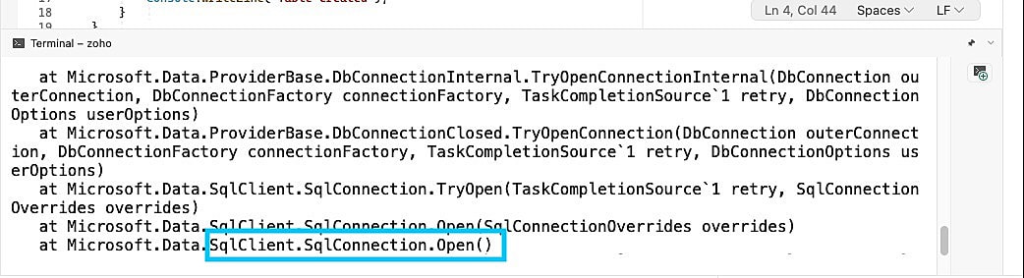
A connection timeout error means the connection timed out before the application could connect. Usually, you’ll receive this error if your connection takes longer than 15 seconds.
First, simulate a connection timeout by connecting to the wrong server. To do this, change the server address in the connection string:
using Microsoft.Data.SqlClient;
// change the server address to a wrong address
string connectionString = “Server=<wrong-server-address>;Database=<your-database>;User Id=<your-Id>;Password=<your-password>;TrustServerCertificate=true”;
for (int i = 0; i < 10; i++)
{
// create a connection
using (SqlConnection connection = new SqlConnection(connectionString))
{
// open the connection
connection.Open();
Thread.Sleep(10);
Console.WriteLine(“connection opened ” + i);
}
}
When you execute the code with the wrong server address, you get an error like this:
4. Use Connection Leak Detection
HikariCP example:
spring.datasource.hikari.leak-detection-threshold=30000
5. Avoid Long-Running Queries
Long queries keep connections busy and reduce overall throughput.
6. Monitor Connection Pool Metrics
Use:
- Prometheus
- Grafana
- Micrometer
to monitor:
- Active connections
- Idle connections
- Wait time
Common Connection Pooling Issues and How to Fix Them
1. Connection Leaks
Cause: Connections not closed properly.
Fix:
- Use try-with-resources
- Enable leak detection
To avoid connection leaks like in the code below, use Close() to terminate your connections.
for (int i = 0; i < 10; i++)
{
// create a connection
SqlConnection connection = new SqlConnection(connectionString);
// open the connection
connection.Open();
Thread.Sleep(10);
Console.WriteLine(“connection opened ” + i);
// close the connection
connection.Close();
}
It’s easy to forget to close your connections in large projects. The best approach is to open connections with the using statement. Then, the connection closes automatically after use:
for (int i = 0; i < 10; i++)
{
// create a connection
using (SqlConnection connection = new SqlConnection(connectionString))
{
// open the connection
connection.Open();
Thread.Sleep(10);
Console.WriteLine(“connection opened ” + i);
}
}
2. Exhausted Pool (No Available Connections)
Cause:
- Long-running operations
- Improper pool size
- High traffic spikes
Fix:
- Increase max pool size
- Optimize queries
- Use asynchronous processing
3. Stale or Broken Connections
Cause:
- Network interruptions
- DB server restarts
Fix:
- Enable connection validation
- Configure connection timeout
4. Overloaded Database
Too many connections cause DB strain.
Fix:
- Limit pool size based on DB capacity
- Use caching systems (Redis, Memcached)
Lastly,
Connection pooling is essential for building scalable, high-performance Java applications. By reusing existing database connections it reduces latency, improves throughput, and conserves resources. Java provides several mature connection pool implementations, HikariCP being the most efficient and widely used today.
Whether you’re building a microservice, an enterprise application, or a high-throughput backend system, understanding and properly configuring your connection pool will significantly improve application stability and performance.
With best practices like tuning pool sizes, validating connections, monitoring metrics, and avoiding leakages, you can ensure smooth and reliable database interactions at scale.