When discussing databases, two terms often come up: SQL and MySQL. Many beginners assume they are the same, but they serve different purposes. Understanding the difference between SQL and MySQL is essential for developers, database administrators, and IT professionals.
In simple terms:
- SQL is a language.
- MySQL is a database management system that uses SQL.
This article will clearly explain the SQL vs MySQL difference, their features, tools, performance, and ideal use cases.
Understanding SQL
SQL (Structured Query Language) is the standard programming language used to interact with relational databases. It allows users to create, store, retrieve, update, and manage data efficiently within an RDBMS.
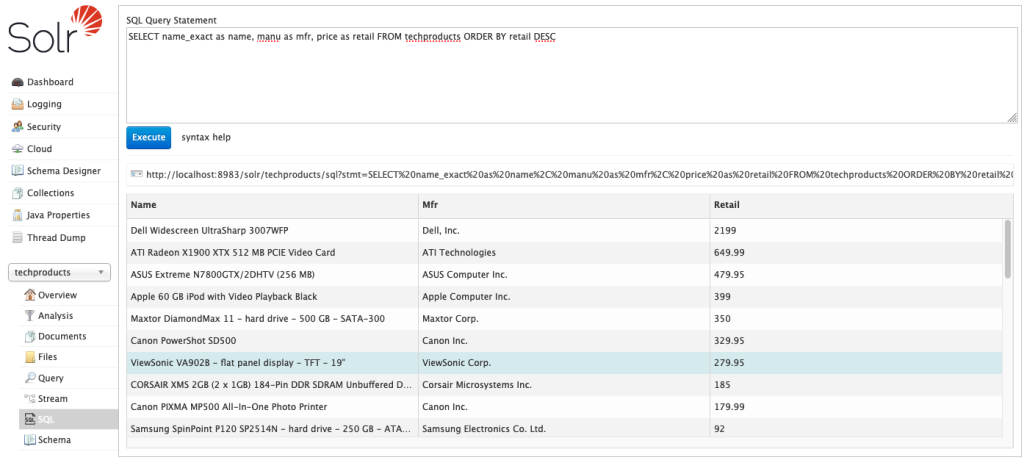
What is SQL?
Structured Query Language (SQL) is a standard programming language used to communicate with relational databases. It allows users to create, retrieve, update, and delete data.
SQL is not software; it is a language used by database systems like MySQL, PostgreSQL, Oracle, and SQL Server.
SQL works by sending structured commands, called queries, to the database. These commands enable users to perform operations such as inserting new records, modifying existing data, deleting records, and retrieving specific information based on conditions.
SQL is divided into different categories of commands:
- Data Definition Language (DDL): Used to define and modify database structures (e.g., CREATE, ALTER, DROP).
- Data Manipulation Language (DML): Used to manage data within tables (e.g., INSERT, UPDATE, DELETE, SELECT).
- Data Control Language (DCL): Used to manage access and permissions (e.g., GRANT, REVOKE).
- Transaction Control Language (TCL): Used to manage transactions (e.g., COMMIT, ROLLBACK).
Key Functions of SQL
- Creating databases and tables
- Inserting and updating records
- Querying data using SELECT statements
- Managing permissions and security
- Performing joins and aggregations
SQL follows standardized syntax defined by ANSI and ISO standards.
Example SQL Query
SELECT * FROM Customers WHERE Country = ‘India’;
This command retrieves all customers located in India.
Also Read: What is SQL & How’s it Different from DBMS
Understanding MySQL
MySQL is an open-source Relational Database Management System (RDBMS) that uses Structured Query Language (SQL) to store, manage, and retrieve structured data. It is one of the most widely used database systems for web applications, enterprise software, and cloud-based platforms.
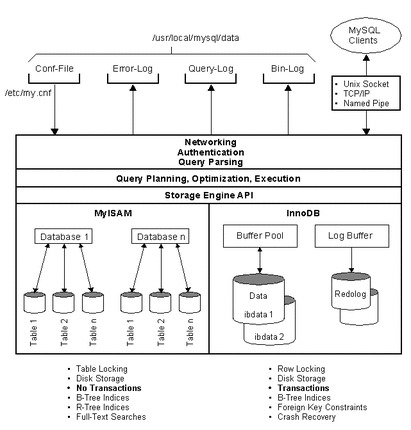
What is MySQL?
MySQL is an open-source Relational Database Management System (RDBMS). It uses SQL as its query language to manage data. MySQL was originally developed by MySQL AB and is now owned by Oracle Corporation.
In short:
- SQL = Language
- MySQL = Software that uses SQL
MySQL is widely used in web development and is part of the popular LAMP stack (Linux, Apache, MySQL, PHP). MySQL is a powerful yet user-friendly database system that helps applications store and manage structured data securely and efficiently.
You might also like: Top 10 SQL Interview Questions and Answers for Experienced Professionals
Key Differences Between SQL and MySQL
Understanding the difference between SQL and MySQL becomes easier when comparing them across multiple parameters.
1. Definition and Purpose
| SQL | MySQL |
| A query language | A database management system |
| Used to interact with databases | Used to store and manage databases |
So, the difference between SQL and MySQL starts with their nature—language vs software.
2. Licensing and Cost
- SQL is a standard language and is free to use.
- MySQL is open-source, but also offers paid enterprise editions.
MySQL Community Edition is free, while enterprise features require licensing.
3. Platform Support and Compatibility
- SQL works with many database systems like Oracle, PostgreSQL, SQL Server, and MySQL.
- MySQL runs on multiple operating systems including Windows, Linux, and macOS.
SQL is universal, while MySQL is one specific implementation.
4. Syntax and Language Features
SQL syntax is standardized but may vary slightly depending on the database system.
For example:
- MySQL may support specific extensions.
- Other systems, like Microsoft SQL Server, may have proprietary functions.
Thus, while SQL is consistent in principle, implementation differs.
5. Storage Engines
One major SQL vs MySQL difference is storage engine support.
MySQL supports multiple storage engines, such as:
- InnoDB
- MyISAM
- Memory
SQL itself does not deal with storage engines, it only defines how to query data.
6. Security Features
SQL defines commands for access control, such as:
GRANT SELECT ON database_name TO user;
MySQL implements these security features and adds:
- User authentication
- Role-based access
- SSL support
- Encryption
MySQL provides built-in mechanisms to enforce SQL security commands.
7. Performance and Scalability
- SQL performance depends on the database system being used.
- MySQL is known for fast read operations and good performance for web applications.
MySQL performs well for medium to large-scale applications but may require optimization for very high transactional systems.
8. Database Size Handling
MySQL can handle large databases, but enterprise systems sometimes prefer solutions like Oracle Database or SQL Server for extremely large enterprise environments.
SQL itself has no size limitation – it depends on the RDBMS implementation.
9. Query Processing Speed
MySQL is optimized for fast query execution, especially for read-heavy workloads such as websites. However, systems like SQL Server may perform better in highly complex analytical operations.
Development and Management Tools
Modern database systems are supported by a variety of development and management tools that simplify creation, monitoring, and maintenance of databases. When comparing SQL and MySQL, it’s important to distinguish between the language and the database system, as the tools available cater differently to each.
These tools improve productivity, ensure data integrity, and help manage complex workloads efficiently.
SQL Server Management Tools
SQL Server Management Studio (SSMS) is used to manage SQL Server databases. It provides:
- GUI-based query execution
- Database design tools
- Performance monitoring
- Security management
MySQL Workbench and Other Tools
MySQL Workbench is the official GUI tool for MySQL.
Features include:
- Visual schema design
- Query development
- Server configuration
- Data modeling
MySQL also integrates with phpMyAdmin and other third-party tools.
Community Support and Documentation
- SQL as a language has vast documentation through ANSI standards and vendor documentation.
- MySQL has a strong open-source community support and official documentation from Oracle.
Because MySQL is open-source, it benefits from global developer contributions.
Use Cases: When to Choose SQL vs MySQL
Choosing between SQL as a language and MySQL as a database system depends on your project’s needs, infrastructure, and scope.
When to Use SQL
SQL is used whenever you need to query, manipulate, or manage data in a relational database. If your application involves data analysis, reporting, or working with multiple database systems, SQL skills are essential.
For instance, a business analyst writing complex queries on Oracle, SQL Server, or PostgreSQL databases relies on SQL to extract insights and generate reports. SQL is platform-independent, so it is the right choice when you want to interact with any relational database engine without being tied to a specific system.
Ideal Scenarios for SQL Server
Organizations may choose SQL Server (which uses SQL) when:
- Enterprise-level business applications
- Advanced analytics and reporting
- Strong integration with the Microsoft ecosystem
- Large corporate infrastructure
When to Use MySQL
MySQL is a full-fledged RDBMS, so it is the go-to solution when you need a complete database management system for storing, organizing, and securing structured data. MySQL is ideal for web applications, SaaS platforms, content management systems, e-commerce sites, and small-to-medium enterprise applications that require reliable performance, transaction support, and multi-user access.
MySQL also offers a rich ecosystem of tools for administration, backup, monitoring, and integration, making it suitable for both development and production environments.
Best Use Cases for MySQL
MySQL is ideal for:
- Web applications
- Content management systems (WordPress, Joomla)
- E-commerce platforms
- Small to medium-sized business systems
- Startups requiring cost-effective solutions
This clarifies the difference between MySQL and SQL in practical use cases.
Similarities Between SQL and MySQL
Although SQL and MySQL serve different roles, one being a language and the other a database system, they share several key similarities:
Despite their differences, SQL and MySQL are closely connected:
- MySQL uses SQL as its query language.
- Both deal with relational databases.
- Both support CRUD operations (Create, Read, Update, Delete).
- Both enforce structured data storage.
1. Relational Database Focus
Both SQL and MySQL are designed for working with relational databases, where data is organized into tables with rows and columns.
2. Use of SQL Language
MySQL uses SQL as its query language. Commands like SELECT, INSERT, UPDATE, and DELETE are common to both. Knowing SQL is essential to interact with MySQL.
3. Support for ACID Transactions
Both enable reliable and consistent data operations through support for ACID (Atomicity, Consistency, Isolation, Durability) properties.
4. Data Retrieval and Manipulation
They allow data querying, filtering, sorting, and joining across tables, providing the tools needed for structured data management.
5. Industry Standard
Both SQL and MySQL are widely adopted in the industry and form the backbone of enterprise, web, and cloud applications.
In short, you cannot use MySQL effectively without SQL knowledge.
Future Trends and Developments
The landscape of relational databases and SQL-based systems is evolving rapidly to meet the demands of modern applications, big data, and cloud computing. Several key trends and developments are shaping the future of SQL and MySQL:
Future Trends and Developments in SQL and MySQL
1. Cloud-Native and Managed Databases
MySQL and other SQL-based systems are increasingly offered as fully managed cloud services (e.g., Amazon RDS for MySQL, Google Cloud SQL). These services automate backups, scaling, and maintenance, allowing businesses to focus on development rather than infrastructure.
2. Integration with Big Data and Analytics
SQL is evolving to handle large-scale analytics and integration with big data platforms. MySQL is integrating with tools for real-time reporting, business intelligence, and data warehousing to support data-driven decision-making.
3. Performance Optimization and AI Assistance
Modern developments include AI-powered query optimization, indexing, and predictive performance tuning. MySQL and other RDBMS platforms are leveraging machine learning to automatically improve efficiency and detect anomalies.
4. Multi-Model and Hybrid Capabilities
Future MySQL versions and SQL-based systems are expanding to support JSON, document, and key-value formats, enabling multi-model data handling within a single relational database. This increases flexibility for modern web and cloud applications.
5. Enhanced Security and Compliance
With growing cyber threats and stricter data regulations, SQL and MySQL are evolving with stronger encryption, role-based access controls, and built-in compliance monitoring for standards like GDPR, HIPAA, and PCI DSS.
6. Edge and Distributed Deployments
As IoT and global applications grow, MySQL is being adapted for distributed and edge computing, providing low-latency access while maintaining data consistency and integrity across locations.
The future of SQL and MySQL focuses on cloud-native scalability, AI-driven optimization, multi-model support, real-time analytics, and enhanced security, ensuring these technologies remain central to modern data management and enterprise applications.
The database landscape is evolving with:
- Cloud-managed databases
- AI-driven query optimization
- Serverless databases
- Hybrid and multi-cloud deployments
Cloud providers such as Amazon Web Services and Microsoft offer managed MySQL services and SQL-based solutions.
MySQL continues to improve in scalability and security, while SQL remains the universal standard for relational database communication.
Conclusion
The difference between SQL and MySQL is simple yet fundamental:
- SQL is a language used to interact with relational databases.
- MySQL is a relational database management system that uses SQL.
To summarize the SQL vs MySQL difference:
| Aspect | SQL | MySQL |
| Type | Language | Software (RDBMS) |
| Purpose | Querying & managing data | Storing & managing databases |
| Ownership | Standardized language | Owned by Oracle |
| Usage | Used by many DB systems | One specific DB system |
Understanding what SQL and MySQL helps developers choose the right tools for application development. If you are learning databases, start with SQL fundamentals, then move to implementing them using systems like MySQL.
SQL is the language you speak, and MySQL is one of the systems that understands and executes that language.