The test data is very essential in test automation. The test automation framework developers store and manage test data in a variety of formats, with Microsoft Excel being one of the most popular and widely utilized. Even manual QAs save their test results in Excel files. To access this test data in automation frameworks, Java provides a number of libraries, one of which is Apache POI. Following that, in this article, we will begin our trip with the Apache POI by learning how to obtain the Apache POI and utilize it in an automated framework by covering the specifics under the following topics:
What is Apache POI used for?
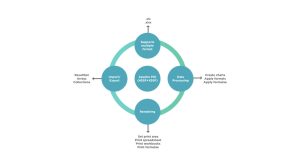
The Apache POI library is an open-source library created and provided by the Apache Foundation. Furthermore, it is primarily used in Java programs to produce, read, and edit Microsoft Office files, particularly Excel files. Furthermore, it is offered as a JAR, which includes several ways for manipulating Microsoft Excel files. The graphic below depicts the many formats and activities supported by Apache POI:
How to download Apache POI?
The Apache POI library must be downloaded first in order to store and access test data in Excel files. As a result, complete the procedures outlined below to obtain the Apache POI library:
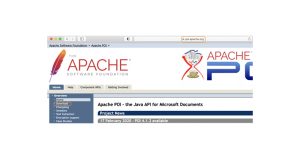
1. First, browse the Apache POI webpage. After that, select the Download link in the left menu.
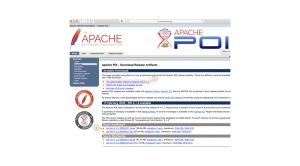
2. Now this will take you to the page showing the latest release of Apache POI as highlighted below:
3. Click on the “Latest Stable Release Link “ which will take you to the page down to the binaries of Apache POI, or you can directly scroll down to the section of binaries. Once you click on the zip file, it will take you to the page which shows various download links.
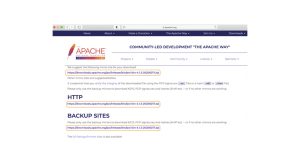
4. It will download a zip once you click on any of the highlighted links.
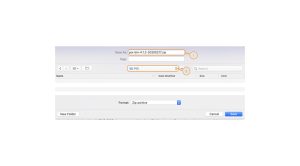
5. After the file is unzipped, it will show the components as below:
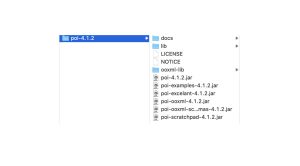
These are the JAR files that contain the classes and methods that we utilize to manipulate various MS-Office file formats. Following that, let’s look at how we can include these JARs in our applications and utilize them to manipulate the different available file formats.
You might also like:
Best Java Frameworks in 2026 for Web and Backend Development
16 Tricky Java Developer Interview Questions And How to Answer Them
5 Important reasons why every developer should learn Java
How to install POI libraries?
As we saw in the preceding sections, all of the Apache POI libraries are accessible as JARs. These JARs should now be available in the build path of your application/framework in order to utilize the POI functionality. Furthermore, in our articles, we mostly use Eclipse as an IDE. As a result, let’s briefly look at how we may add the Apache POI JARs to a project’s build path in Eclipse:
Configure POI libraries in Eclipse?
Follow the below steps to add the POI JARs in a project in Eclipse:
- Assume you generated a JAVA project in Eclipse
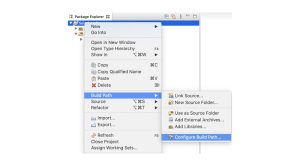
2. Next, in Eclipse, right-click on the project and select Properties. Then, as seen below, select Build Path >> Configure Build Path.
3. It will display the project’s “Properties.” Then, go to the Libraries tab. Finally, as seen below, click on the Add External JARs button.
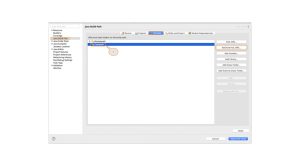
Note: Classpath should be selected when adding the External JARs.
4. Select the JARs in the unzipped POI files’ parent folder. After that, click the Open button to add them to the Eclipse project:
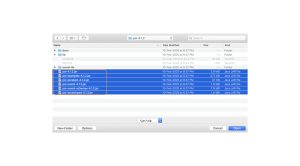
5. Next, in the unzipped POI folder, select the JARs in the ooxml-lib folder. Furthermore, it is as follows:
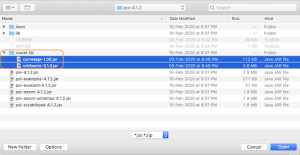
6. Select the JARs in the unzipped POI folder’s lib folder. Furthermore, as stated below:
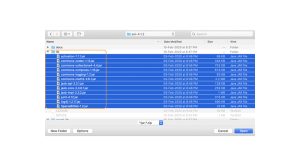
7. Once all of the POI JARs have been added, click the Apply and Close button as mentioned below:
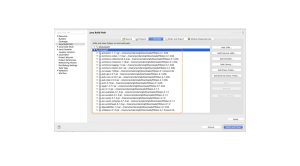
8. Once all of the POI libraries have been successfully installed in the Eclipse project, they will be visible in the left pane of the Eclipse project structure, as seen below:
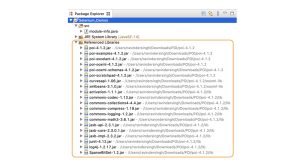
You may also customize the build path by adding a subdirectory called “jarfiles” to the project and copy-pasting all the jars into it. Then, right-click the folder and select Build Path > Configure Build Path > Select All Jar Files > Apply and Close. As a result, all of the jar files are placed.
So that’s it for installing Apache POI in an Eclipse project. As a result, we can now begin utilizing the features of these libraries in our JAVA Project.
Summing Up
Quality analysis necessitates testing and perfecting all software prior to release. As a result, every Quality Analyst team requires a set of cutting-edge technologies to speed their testing methods. Consider technologies that adhere to extensive testing methods and adapt to your individual requirements.
The software development cycle necessitates the use of a powerful automated testing solution capable of accelerating the full chain of testing activities while not missing any issues. Choose one that automates every testing process, empowers developers, and allows you to build, execute, and manage tests in real time. On your servers, you may mimic a high “peak-time” load. Apache‘s full-featured IDE enables for quick recording, compiling, and debugging. As if that wasn’t enough, Apache JMeter also supports Continuous Integration via Maven, Jenkins, and Gradle.