The data-driven world demands more than just managing information efficiently. It is critical for businesses, institutions, and applications that they future proof their data by choosing the most secured and powerful Database Management System. Whether it is a banking system, e-commerce website, school management software, or enterprise ERP platform, all rely on structured data storage systems.
This is where DBMS and RDBMS come into play. While both are used to store, manage, and retrieve data, there are fundamental distinctions between them. Understanding the difference between DBMS and RDBMS helps organizations choose the right technology for their data requirements.
Before we discuss the differences between DBMS and RDBMS, let’s first understand what each system means.
What is DBMS?
A Database Management System (DBMS) is software that enables users to create, store, retrieve, and manage data in databases. It acts as an interface between users/applications and the database. Helps organizations manage large volumes of data reliably and securely, forming the backbone of modern applications, enterprise systems, analytics platforms, and digital operations.
In simple terms:
- A database is a collection of organized data.
- A DBMS is the software used to manage the database.
This explains the database and DBMS difference; the database stores data, while DBMS manages it.
A DBMS can store data in various formats such as files, hierarchical models, or network models. It does not necessarily enforce relationships between data tables.
Key Features of DBMS
A Database Management System (DBMS) provides several essential features that ensure efficient, secure, and reliable data management. Together, these features make a DBMS a critical component for managing data securely, accurately, and efficiently in modern systems.
Data Storage and Organization
A DBMS stores data in a structured format, making it easy to organize, retrieve, and manage large volumes of information systematically.
Data Integrity and Consistency
It enforces rules, constraints, and relationships to maintain accuracy and prevent duplication or corruption of data.
Security and Access Control
A DBMS restricts access through authentication, authorization, and role-based permissions, protecting sensitive information from unauthorized users.
Concurrency Control
Multiple users can access and modify the database simultaneously without conflicts, ensuring smooth multi-user operations.
Transaction Management
It supports ACID properties (Atomicity, Consistency, Isolation, Durability) to ensure reliable and error-free transaction processing.
Backup and Recovery
A DBMS provides mechanisms to back up data and restore it in case of system failures, crashes, or cyber incidents.
Data Independence
Applications can operate without being affected by changes in the underlying data structure, improving system flexibility.
Query Processing
It allows users to retrieve and manipulate data efficiently using structured query languages like SQL.
Also Read: What is SQL & How’s it Different from DBMS
Examples of DBMS
DBMS is typically suitable for smaller systems where complex relationships between data are not required. Some commonly known example of DBMS and RDBMS (DBMS side) include:
- Microsoft Access
- dBASE
- FoxPro
These systems are often used for small-scale applications and desktop-based database management.
Understanding RDBMS
A Relational Database Management System (RDBMS) is an advanced version of DBMS that stores data in the form of tables (relations). These tables are interconnected using keys such as primary keys and foreign keys.
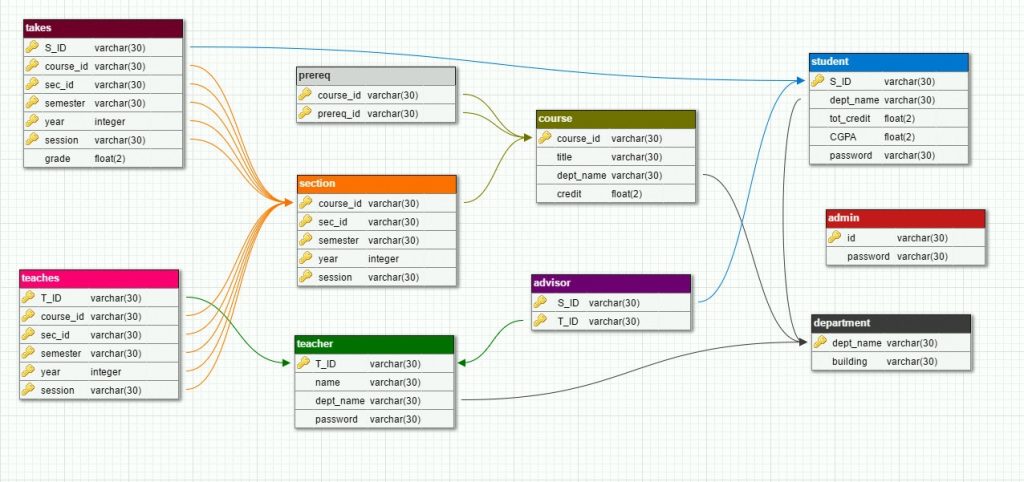
A DBMS handles essential functions such as data storage, querying, updating, security management, backup, and recovery. It also ensures data integrity and consistency by enforcing rules and constraints. Multiple users can access and modify data simultaneously without conflicts, thanks to built-in transaction management features.
RDBMS is based on the relational model introduced by E.F. Codd, where data is organized into rows and columns.
The key difference between a database and a relational database lies in structure, relational databases organize data in structured tables with defined relationships.
Also Read: What is Relational Database (RDMS)?
Core Concepts of RDBMS
A Relational Database Management System (RDBMS) organizes data into structured tables and maintains relationships between them. Below are its core concepts:
- Tables (Relations)
Data is stored in tables, where each table represents an entity (e.g., customers, orders). Tables consist of rows and columns. - Rows (Tuples)
Each row represents a single record in a table. For example, one customer’s complete details form a row. - Columns (Attributes)
Columns define the type of data stored in a table, such as name, date, price, or ID. Each column has a specific data type. - Primary Key
A primary key uniquely identifies each row in a table. No two records can have the same primary key value. - Foreign Key
A foreign key creates a relationship between two tables by referencing the primary key of another table. - Relationships
Tables are connected through relationships such as one-to-one, one-to-many, or many-to-many, ensuring logical data organization. - Normalization
Normalization is the process of organizing data to reduce redundancy and improve data integrity. - SQL (Structured Query Language)
RDBMS uses SQL to create, modify, retrieve, and manage data efficiently. - ACID Properties
RDBMS ensures reliable transactions through Atomicity, Consistency, Isolation, and Durability.
These features make RDBMS more structured and reliable compared to a traditional DBMS.
Popular RDBMS Examples
Relational Database Management Systems (RDBMS) are widely used across industries for managing structured data and supporting complex transactions. Here are some of the most popular RDBMS platforms:
1. MySQL
An open-source RDBMS widely used for web applications and enterprise systems. It is known for reliability, performance, and ease of use.
2. Oracle Database
A powerful enterprise-grade RDBMS used by large organizations for mission-critical applications, offering advanced security, scalability, and analytics capabilities.
3. Microsoft SQL Server
Developed by Microsoft, it is commonly used in enterprise environments and integrates well with other Microsoft tools and cloud services.
4. PostgreSQL
An advanced open-source RDBMS known for its extensibility, standards compliance, and strong support for complex queries and custom functions.
5. IBM Db2
An enterprise-level RDBMS designed for high-performance data processing, widely used in banking, finance, and large-scale business systems.
These RDBMS platforms support structured data storage, enforce relationships, and ensure transaction reliability, making them essential for modern enterprise applications. They are widely used in enterprise applications, banking systems, ERP software, and large-scale web platforms.
DBMS vs RDBMS: Key Differences
A DBMS (Database Management System) is software used to store, manage, and retrieve data, while an RDBMS (Relational Database Management System) is an advanced type of DBMS that organizes data into related tables.
Understanding the DBMS vs RDBMS difference requires examining several aspects.
1. Data Organization and Structure
- DBMS: Stores data as files or hierarchical structures.
- RDBMS: Stores data in tabular format (rows and columns).
RDBMS uses structured schema design, while DBMS may not strictly enforce structured relationships.
2. Relationship Handling
- DBMS: Does not support complex relationships between data.
- RDBMS: Supports relationships using primary and foreign keys.
This is one of the major points when we distinguish between DBMS and RDBMS.
3. Data Integrity and Constraints
- DBMS: Limited support for integrity constraints.
- RDBMS: Supports entity integrity, referential integrity, and domain constraints.
RDBMS ensures higher data reliability and consistency.
4. Normalization
- DBMS: Does not strictly follow normalization rules.
- RDBMS: Uses normalization techniques to reduce redundancy.
Normalization improves database efficiency and reduces duplication.
5. Query Language and Flexibility
- DBMS: May use basic query methods.
- RDBMS: Uses SQL for advanced querying.
SQL enables complex joins, aggregations, and transaction handling.
6. Scalability and Performance
- DBMS: Suitable for small applications.
- RDBMS: Designed for enterprise-level scalability and multi-user environments.
RDBMS handles large datasets more efficiently.
7. ACID Properties and Transaction Management
- DBMS: Limited transaction support.
- RDBMS: Fully supports ACID properties (Atomicity, Consistency, Isolation, Durability).
This makes RDBMS ideal for banking and financial systems.
Summary Table: DBMS vs RDBMS
| Feature | DBMS | RDBMS |
| Data Model | File-based/Hierarchical | Relational (Table-based) |
| Relationships | Not enforced | Enforced via keys |
| Normalization | Not mandatory | Mandatory |
| Multi-user Support | Limited | High |
| Security | Basic | Advanced |
| ACID Compliance | Partial | Full |
This clearly explains the difference between DBMS and RDBMS with example.
When to Use DBMS vs RDBMS
Choosing between a DBMS and an RDBMS depends on the complexity, scale, and requirements of your application.
Use Cases for DBMS
A DBMS is suitable for small-scale applications where data relationships are minimal and the number of users is limited. It works well for single-user systems, simple data storage needs, or lightweight desktop applications. If the focus is basic data management without complex transactions or strict integrity rules, a DBMS can be sufficient and cost-effective.
- Small-scale applications
- Personal projects
- Single-user systems
- Basic record-keeping systems
Example: A small school maintaining student records locally using Microsoft Access.
Scenarios Best Suited for RDBMS
- Banking systems
- E-commerce platforms
- ERP systems
- Enterprise applications
- Large-scale multi-user systems
RDBMS is preferred where data consistency and reliability are critical.
Advantages of RDBMS over DBMS
An RDBMS (Relational Database Management System) offers several significant advantages compared to a traditional DBMS, especially for complex and enterprise-level applications.
1. Structured Data with Relationships
RDBMS stores data in well-defined tables and establishes relationships using primary and foreign keys. This ensures better organization and logical data connectivity.
2. Reduced Data Redundancy
Through normalization techniques, RDBMS minimizes duplicate data, improving storage efficiency and maintaining data consistency.
3. Strong Data Integrity
RDBMS enforces constraints (such as unique, not null, and foreign key constraints), ensuring accuracy and preventing invalid data entries.
4. Multi-User Support
Unlike basic DBMS systems, RDBMS is designed to handle multiple users accessing and updating data simultaneously.
5. Advanced Security
RDBMS provides robust security features, including role-based access control and user-level permissions.
6. ACID-Compliant Transactions
RDBMS supports Atomicity, Consistency, Isolation, and Durability (ACID) properties, ensuring reliable transaction processing, critical for banking, healthcare, and enterprise systems.
7. Scalability and Performance
RDBMS platforms are built to handle large volumes of data and complex queries efficiently.
Because of these benefits, most modern applications use RDBMS instead of traditional DBMS.
Limitations of DBMS and RDBMS
While DBMS and RDBMS are powerful data management systems, they also have certain limitations.
DBMS Drawbacks
DBMS is limited in scalability and relationship handling, while RDBMS, though powerful and reliable, can be complex and resource-intensive for certain use cases.
- Limited scalability
- No strong relationship handling
- Higher data redundancy
- Weak transaction control
RDBMS Challenges
- More complex setup
- Higher cost
- Requires skilled database administrators
- Performance overhead for complex queries
Though RDBMS is more powerful, it may not always be necessary for simple applications.
You might also like: 10 Best Database Management Systems For Software Developers
Future Trends in Database Management
The database landscape is evolving rapidly as organizations generate larger, more complex, and more distributed data sets. Several key trends are shaping the future of database management:
NoSQL and NewSQL Databases
Modern applications handling big data often use NoSQL databases such as:
- MongoDB
- Cassandra
NewSQL databases combine relational structure with scalability features.
These systems are sometimes compared when discussing the difference between ODBMS and RDBMS, as object-oriented databases (ODBMS) also provide alternative data modeling approaches.
Cloud-based Database Solutions
Cloud platforms now offer managed database services such as:
- Amazon RDS
- Google Cloud SQL
- Azure SQL Database
Cloud-based solutions enhance scalability, backup, and global accessibility.
Conclusion: Choosing Between DBMS and RDBMS
The difference between DBMS and RDBMS primarily lies in structure, relationship management, scalability, and data integrity enforcement.
- DBMS is suitable for small, simple, single-user applications.
- RDBMS is ideal for complex, large-scale, multi-user systems requiring data integrity and ACID compliance.
When evaluating DBMS vs. RDBMS, consider:
- Application size
- Budget
- Data complexity
- Scalability requirements
- Security needs
In modern enterprise environments, RDBMS is the dominant choice due to its structured design, relational integrity, and transactional reliability. However, DBMS still plays a role in small-scale or lightweight applications.
By clearly understanding dbms vs rdbms difference, organizations and students alike can make informed decisions about database selection and system architecture.