Cloud computing has fundamentally changed how organizations build, deploy, and scale IT systems. Instead of investing heavily in on-premises hardware and managing complex infrastructure, businesses today can access computing resources on demand over the internet. As a business, you do not need to invest in heavy machinery and infrastructure; you can manage all your operational needs with monthly subscription models.
This shift has led to the rise of structured cloud computing service models that define how resources are delivered and managed.
Understanding the different cloud service models is essential for IT leaders, business strategists, and digital transformation teams. Each model, whether focused on applications, platforms, or infrastructure, offers varying degrees of control, flexibility, and responsibility.
While cloud computing deployment models (such as public, private, hybrid, and multi-cloud) define where cloud services are hosted, cloud computing delivery models define how those services are provided to users. In this article, we will explore the three primary models – SaaS, PaaS, and IaaS, along with emerging models such as FaaS and CaaS, and examine how organizations can choose the right cloud model for their needs.
Cloud computing can be implemented in very few steps, even with less manual intervention involved.
The Three Main Cloud Service Models
The foundation of modern cloud computing revolves around three main models:
- Software as a Service (SaaS)
- Platform as a Service (PaaS)
- Infrastructure as a Service (IaaS)
These are commonly referred to as IaaS, PaaS, and SaaS models, and they represent increasing levels of user control from SaaS to IaaS.
Software as a Service (SaaS)
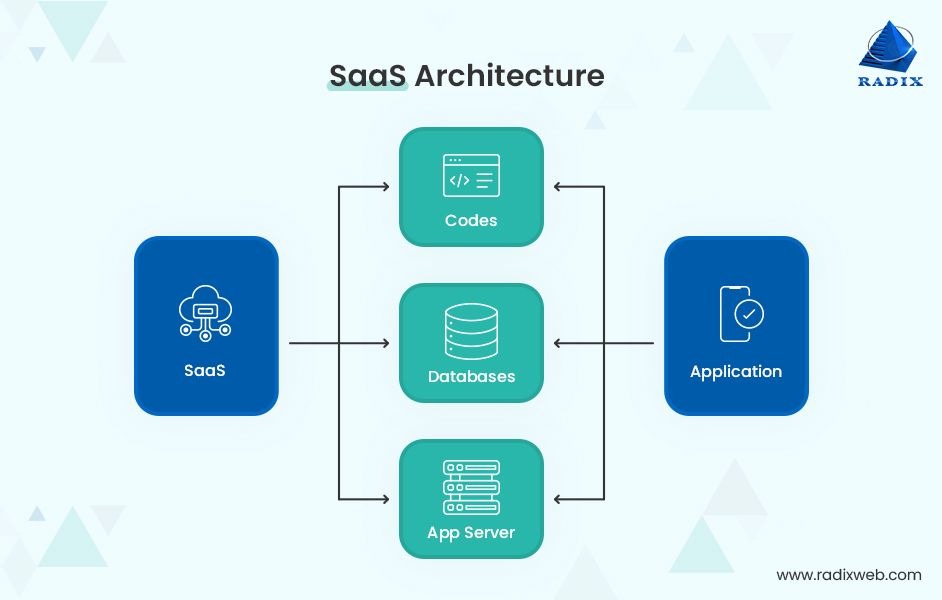
What is SaaS?
Software as a Service (SaaS) is a cloud model where applications are delivered over the internet on a subscription basis. Users access the software via web browsers without installing or maintaining it locally.
The cloud provider manages:
- Infrastructure
- Servers
- Storage
- Networking
- Middleware
- Application updates and security
Users simply log in and use the software.
Multi-tenant and single-tenant
When evaluating SaaS architecture, one of the most strategic decisions is choosing between multi-tenant and single-tenant models. This choice impacts scalability, cost, compliance, customization, performance, and long-term product strategy.
Single Tenent SaaS model
In a single-tenant SaaS model, each customer has a dedicated application instance and database. No infrastructure is shared, which ensures strong physical data isolation. This setup provides greater control over security, performance, and customization.
Because environments are separate, customers can implement specific configurations, integrations, or compliance-driven workflows without impacting others. Upgrades and changes can also be scheduled independently, which is especially useful in regulated industries where validation and change control are critical.
However, single-tenancy increases infrastructure and maintenance costs. Each tenant requires separate monitoring, updates, and support, making scaling more resource-intensive for the provider.
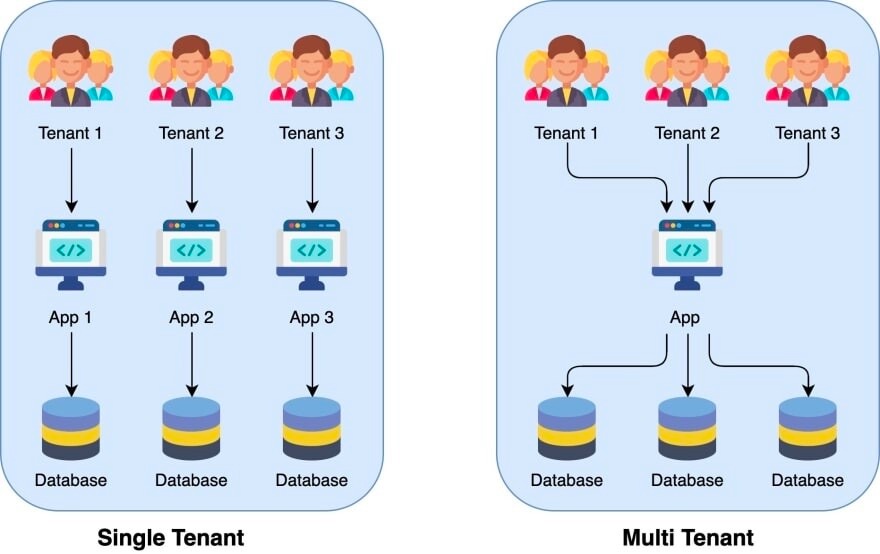
Multi-Tenant SaaS Model
In a multi-tenant SaaS model, multiple customers share the same application and infrastructure while their data is logically separated. Isolation is achieved through tenant identifiers, role-based access controls, and strong security architecture.
This model reduces operational costs and enables faster innovation because updates and patches are deployed centrally. It also supports easy scalability, making it ideal for serving a large customer base efficiently.
The trade-off is limited deep customization and increased responsibility for ensuring strict logical data separation. While secure when designed properly, it requires robust governance and architecture to maintain customer trust.
Here is a brief differentiation between the two to help you choose the best SaaS model.
| Feature | Multi-Tenant | Single-Tenant |
| Infrastructure | Shared | Dedicated |
| Cost | Lower | Higher |
| Customization | Limited | Extensive |
| Data Isolation | Logical | Physical |
| Upgrade Control | Vendor-controlled | Customer-controlled |
| Compliance Fit | Good | Stronger for regulated sectors |
Examples of SaaS
Here are some well-known examples of SaaS (Software as a Service) across different categories:
1. Customer Relationship Management (CRM)
- Salesforce – Cloud-based CRM platform for sales, marketing, and service teams.
- HubSpot – CRM with marketing automation and customer engagement tools.
2. Collaboration & Productivity
- Google Workspace – Cloud-based email, documents, spreadsheets, and collaboration tools.
- Microsoft 365 – Online versions of Word, Excel, Teams, and Outlook.
- Slack – Team communication and collaboration platform.
3. Project Management
- Asana – Task and workflow management platform.
- Trello – Visual project tracking using boards and cards.
4. Accounting & Finance
- QuickBooks Online – Online accounting for small and medium businesses.
- Xero – Financial management and bookkeeping software.
5. Design & Creative Tools
- Canva – Online graphic design tool.
- Adobe Creative Cloud – Subscription-based creative tools like Photoshop and Illustrator.
6. E-commerce
- Shopify – SaaS platform to build and manage online stores.
- BigCommerce – Cloud-based e-commerce solution.
7. Enterprise & IT Service Management
- ServiceNow – IT service management and workflow automation.
- Workday – Cloud-based HR and finance management.
What Makes Them SaaS?
All of these:
- Are hosted in the cloud
- Accessible via browser or app
- Operate on subscription models
- Do not require on-premise installation
- Handle updates and maintenance centrally
SaaS Characteristics
- Multi-tenant architecture
- Automatic updates and patch management
- Subscription-based pricing
- Access via web browser
- Minimal user-side configuration
SaaS is the most user-friendly of all cloud service models in cloud computing, as it requires no infrastructure management.
Also Read:
Comparing cloud options in Backend: AWS vs GCP vs Azure
Building Data Pipelines for Multi-Cloud Environments
What is Multicloud?
Platform as a Service (PaaS)
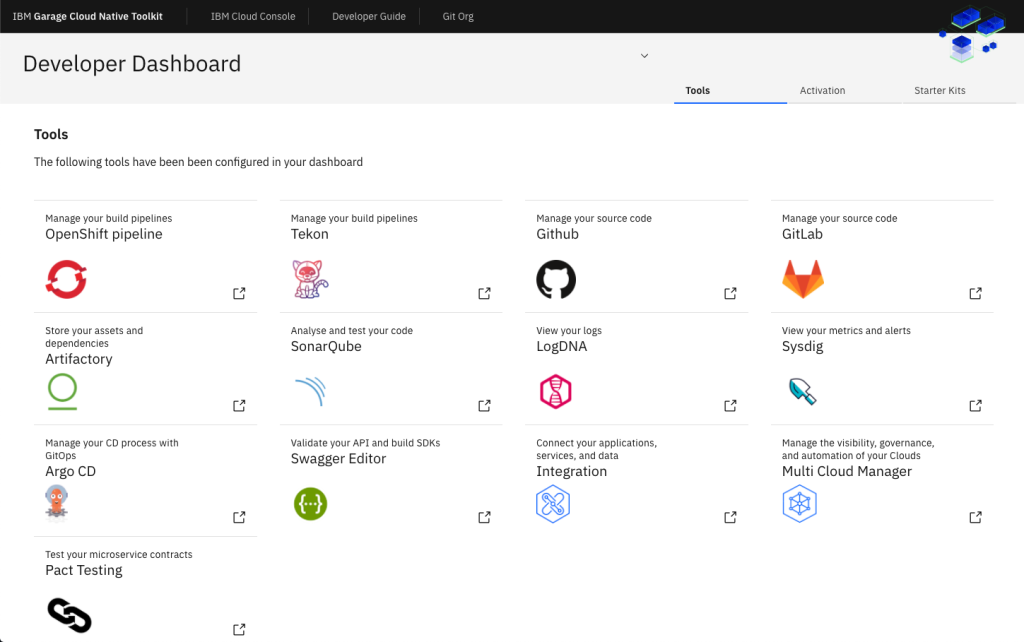
What is PaaS?
PaaS (Platform as a Service) is a cloud computing model that provides a ready-to-use platform for developers to build, test, deploy, and manage applications, without worrying about underlying infrastructure like servers, storage, or networking.
Instead of managing hardware and operating systems, developers focus only on writing and deploying code.
PaaS includes:
A typical PaaS offering provides:
- Application hosting environment
- Operating system
- Database management systems
- Middleware
- Development tools
- Security and scalability features
The cloud provider manages infrastructure, runtime, updates, and patching.
Examples of PaaS Platforms
- Microsoft Azure – Offers Azure App Services and development platforms for hosting applications.
- Google Cloud Platform – Provides App Engine and other developer platforms.
- Amazon Web Services – Offers Elastic Beanstalk for deploying and scaling applications.
- Heroku – Developer-friendly platform for quickly deploying apps.
PaaS Characteristics
- Built-in development tools
- Integrated CI/CD pipelines
- Automatic scalability
- Reduced infrastructure management
- Support for multiple programming languages
PaaS accelerates application development and is ideal for agile and DevOps-driven environments.
Advantages of PaaS
- Faster application development
- Reduced infrastructure management
- Automatic scaling
- Built-in security and monitoring
- Lower operational overhead
Limitations of PaaS
- Less control over infrastructure
- Vendor lock-in risk
- Limited customization at the system level
Infrastructure as a Service (IaaS)
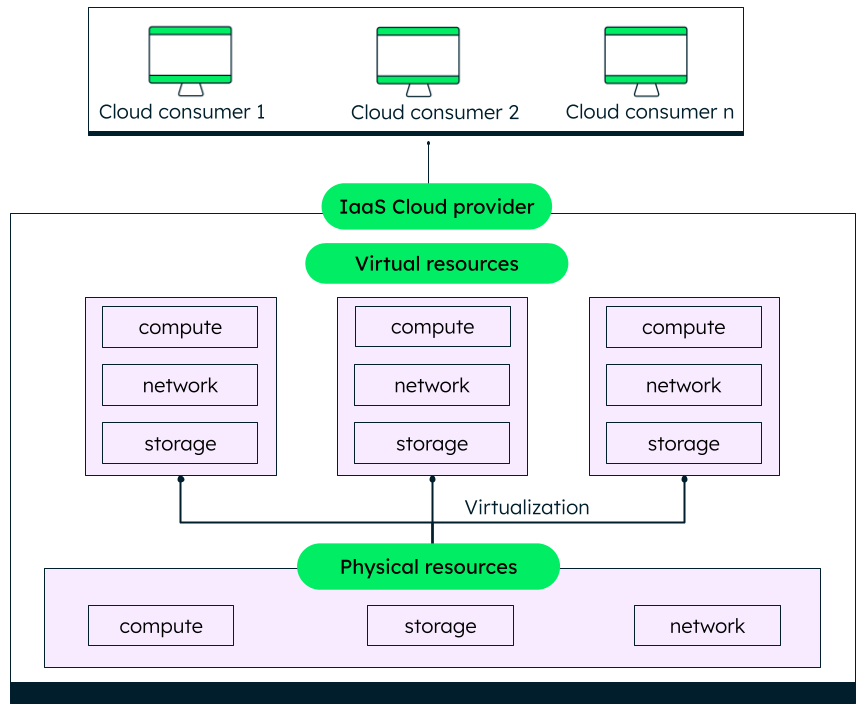
What is IaaS?
Infrastructure as a Service (IaaS) provides virtualized computing resources over the internet. It offers the highest level of control among the three main cloud models.
IaaS includes:
- Virtual machines
- Storage
- Networking
- Load balancers
- Firewalls
Users manage operating systems, applications, and runtime environments.
Examples of IaaS
Major IaaS providers include:
- Amazon Web Services
- Microsoft Azure
- Google Cloud
IaaS Characteristics
- High scalability
- Pay-as-you-go pricing
- Full control over OS and applications
- Virtualization-based infrastructure
- Flexible configuration
IaaS closely resembles traditional on-premise setups, but without physical hardware management.
Advantages and Disadvantages of Cloud Service Models
Benefits of Cloud Service Models
- Cost Efficiency – Reduces capital expenditure on hardware.
- Scalability – Resources can scale up or down instantly.
- Accessibility – Services accessible globally via the internet.
- Automatic Updates – Providers handle maintenance.
- Disaster Recovery – Built-in redundancy and backup solutions.
These benefits make cloud computing delivery models highly attractive for startups and enterprises alike.
Challenges of Cloud Service Models
Organizations must evaluate these risks before adopting a cloud model.
- Data Security & Privacy Concerns
- Vendor Lock-in
- Downtime Risks
- Compliance Challenges
- Limited Customization (SaaS)
Comparing SaaS, PaaS, and IaaS
Key Differences
| Feature | SaaS | PaaS | IaaS |
| User Control | Minimal | Moderate | High |
| Infrastructure Management | Provider | Provider | User |
| Ideal For | End-users | Developers | IT Teams |
| Customization | Low | Medium | High |
In simple terms:
- SaaS = Ready-to-use software
- PaaS = Development environment
- IaaS = Virtualized infrastructure
Use Cases for Every Cloud Service Model
SaaS Use Cases
- Email services
- CRM systems
- Collaboration tools
PaaS Use Cases
- Web app development
- API development
- DevOps pipelines
IaaS Use Cases
- Hosting websites
- Running enterprise applications
- Big data analytics
Emerging Cloud Service Models
Beyond the traditional three models, newer cloud computing service models have emerged to address modern application needs.
Function as a Service (FaaS)
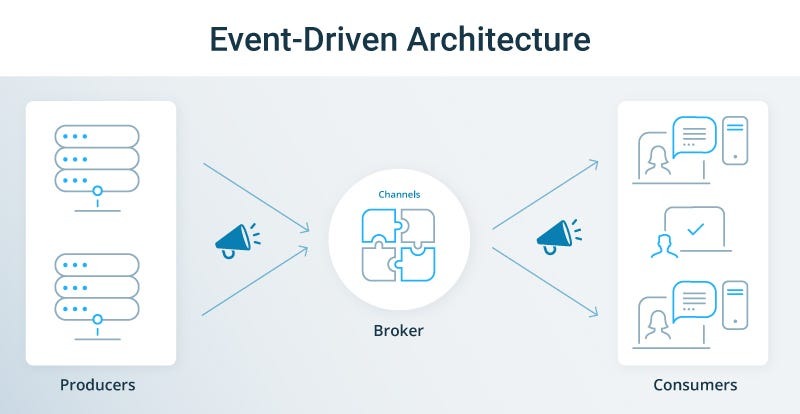
FaaS, often referred to as serverless computing, allows developers to execute code in response to events without managing servers.
Features:
- Event-driven execution
- Automatic scaling
- Pay-per-execution pricing
- Stateless functions
FaaS is ideal for microservices and event-based systems.
Container as a Service (CaaS)
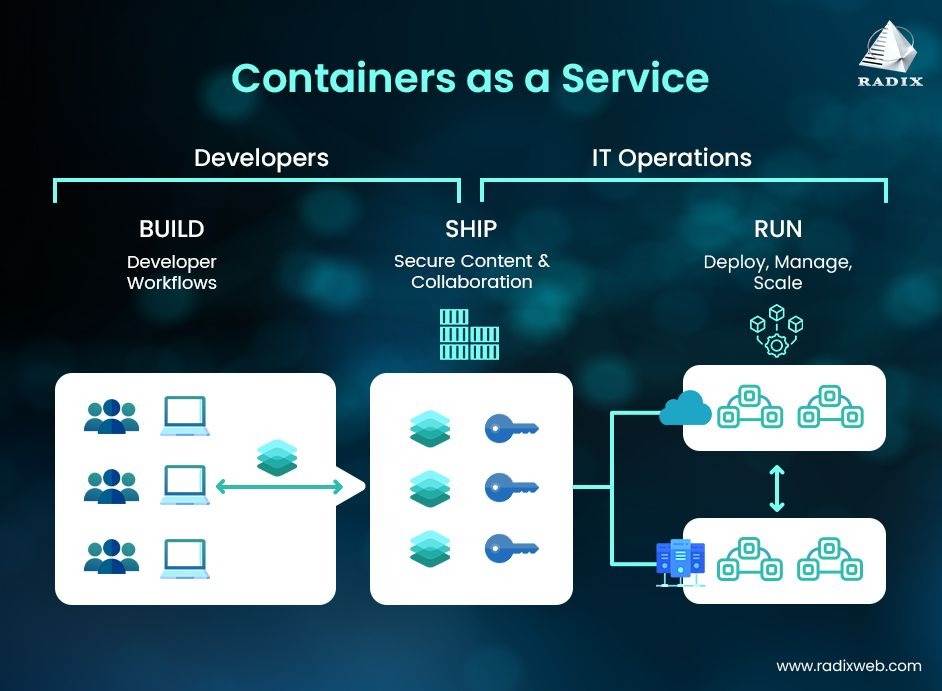
Container as a Service (CaaS) is a cloud service model that allows organizations to deploy, manage, and scale containerized applications using container orchestration platforms, without managing the underlying infrastructure.
It sits between IaaS and PaaS in terms of control and abstraction.
What CaaS Provides
CaaS platforms typically offer:
- Container runtime (e.g., Docker-based environments)
- Container orchestration (usually Kubernetes)
- Cluster management
- Auto-scaling capabilities
- Load balancing
- Networking and storage integration
- Monitoring and logging tools
How applications are hosted in a CaaS
CaaS enables organizations to deploy and manage containerized applications using container orchestration tools.
Features:
- Container management
- Kubernetes integration
- Automated scaling
- High portability
CaaS bridges the gap between IaaS and PaaS and is popular in cloud-native development.
Choosing the Right Cloud Service Model
When choosing the right model, organizations should evaluate several factors. To start with, the level of control required. If regulatory obligations demand detailed infrastructure validation and audit trails, IaaS may be more appropriate. If the goal is rapid application development with moderate control, PaaS offers a balanced approach. If the objective is operational efficiency and quick adoption of proven tools, SaaS is often the best option.
Factors to Consider
- Business objectives
- Budget constraints
- Technical expertise
- Security requirements
- Regulatory compliance
- Required customization
Organizations often adopt hybrid approaches combining multiple cloud deployment models in cloud computing for optimal flexibility.
Best Practices for Implementation of Cloud Models
- Conduct a workload assessment
- Start with non-critical applications
- Implement strong identity and access management
- Ensure compliance and governance
- Avoid vendor lock-in via multi-cloud strategies
- Continuously monitor performance and costs
Strategic planning ensures the successful adoption of cloud computing deployment models.
Future Trends in Cloud Service Models
The future of cloud service models is shaped by:
- Edge Cloud and Distributed Compute
As IoT devices proliferate and latency-sensitive workloads grow, computing is shifting toward the edge. Edge cloud extends cloud capabilities closer to where data is generated or consumed. This supports real-time analytics, smart manufacturing, remote healthcare monitoring, and richer mobile experiences without depending solely on centralized data centers.
Also Read: What is Edge Computing? - Industry-specific cloud platforms
Traditional monolithic apps are being replaced with cloud-native architectures built on microservices and containers. These patterns improve scalability, resilience, and deployment velocity. Containers and orchestration systems like Kubernetes will continue to drive innovation in CaaS and beyond, enabling distributed, modular systems that are easier to manage and evolve. - Serverless and Function-as-a-Service (FaaS)
Cloud computing is moving toward code-centric execution models. With serverless platforms (e.g., AWS Lambda, Azure Functions), developers deploy functions that automatically scale without provisioning servers. This reduces operational overhead and supports event-driven application design, paving the way for more agile, cost-efficient cloud architecture. - AI/ML-Powered Cloud Services
Cloud providers are embedding artificial intelligence and machine learning tools directly into their platforms. From automated code generation and predictive autoscaling to intelligent security analytics, AI is making cloud platforms smarter, faster, and more autonomous. This trend will expand AI-enhanced PaaS and SaaS offerings.
At last,
The evolution of cloud computing service models has transformed the digital landscape. From fully managed SaaS applications to flexible IaaS infrastructure and innovative serverless FaaS solutions, cloud technology now supports organizations of every size and industry. Organizations are increasingly combining IaaS, PaaS, SaaS, FaaS, and CaaS into integrated ecosystems.
The Big Picture
Cloud service models are evolving toward:
- More abstraction – letting developers focus on business logic, not ops
- More intelligence – with AI driving automation and optimization
- More specialization – with vertical clouds tailored to industry needs
- More distribution – extending compute to the edge and hybrid environments
- More compliance-ready design – especially for regulated sectors
Understanding the distinctions among IaaS, Paa, andS, and SaaS, along with emerging models, enables businesses to align technology decisions with strategic goals. By carefully evaluating requirements, security needs, and scalability demands, organizations can select the most suitable cloud deployment models and maximize the benefits of cloud computing.
As digital transformation accelerates worldwide, mastering these cloud service models in cloud computing is no longer optional; it is a competitive necessity.