Data is one of the most valuable assets for organizations in this AI-powered digital era. From banking systems and e-commerce platforms to healthcare and education portals, databases power almost every modern application. To manage this data efficiently, businesses rely on Database Management Systems (DBMS). Different types of DBMS are designed to handle different data structures, workloads, and scalability needs.
Understanding the different types of database management systems helps organizations choosing the right one depends on application complexity, performance requirements, and data relationships and what best for the business needs.
Definition and Importance of DBMS
A Database Management System (DBMS) is software that enables users to create, store, organize, retrieve, update, and manage data efficiently within a structured environment. It acts as an interface between the database and end users or applications, ensuring that data is consistently organized and easily accessible. A DBMS manages data storage, query processing, security, integrity, and backup operations, allowing multiple users and systems to interact with data in a controlled manner.
Why DBMS Is Important
A DBMS is crucial for managing growing volumes of data efficiently, securely, and reliably. It forms the backbone of modern applications, enterprise systems, analytics platforms, and digital transformation initiatives across industries.
The other ways to say this:
- Organizes large volumes of data
- Ensures data consistency and integrity
- Enables multi-user access
- Provides backup and recovery
- Enhances security
Common DBMS software examples include:
- MySQL
- Oracle Database
- Microsoft SQL Server
- MongoDB
Evolution of Database Management Systems
The evolution of Database Management Systems (DBMS) reflects the growing need to store, manage, and analyze increasing volumes of data efficiently. Over time, database technologies have shifted from rigid, file-based systems to highly scalable, cloud-native platforms designed for modern digital ecosystems.
Database systems have evolved significantly:
- File-based systems (manual record keeping)
- Hierarchical databases (1960s)
- Network databases (1970s)
- Relational databases (1980s onwards)
- Object-oriented and NoSQL databases (modern era)
This evolution led to multiple types of database systems designed for different use cases.
Types of Database Management Systems
Database Management Systems (DBMS) are broadly categorized based on how they structure data, manage relationships, and support scalability. Each category serves different business and technical requirements, depending on the complexity, volume, and type of data being handled.
These are the foundational types of databases in DBMS and are still referenced in academic and practical environments, and are classified based on how they store, organize, and manage data. Each type is designed to meet specific application, performance, and scalability needs. The appropriate type depends on the nature of data, performance expectations, and system requirements.
When asked, “What are the 4 types of databases?”, the traditional answer includes:
- Hierarchical DBMS
- Network DBMS
- Relational DBMS (RDBMS)
- Object-Oriented DBMS (OODBMS)
Also Read: Difference Between DBMS and RDBMS
1. Hierarchical Database Management Systems
Hierarchical DBMS organizes data in a tree-like structure where each child record has only one parent. Data relationships follow a strict top-down approach. While efficient for structured and predictable datasets, this model is rigid and difficult to modify. It is mostly found in legacy systems.
Characteristics of Hierarchical DBMS
- Tree structure (parent-child relationship)
- One-to-many relationships
- Fast data retrieval in predefined paths
- Structured and rigid schema
Advantages
- Simple design
- Fast access when the structure is fixed
- Efficient for hierarchical data
Limitations
- Difficult to modify the structure
- Complex many-to-many relationships are not supported
- High data redundancy
Use Cases and Examples
Hierarchical databases were widely used in early mainframe systems.
Example:
IBM Information Management System – Used in banking, telecommunications, and legacy enterprise systems.
2. Network Database Management Systems
Network DBMS improves upon the hierarchical model by allowing a child record to have multiple parent records. This creates a more flexible graph-like structure and supports many-to-many relationships. However, it is complex to design and maintain.
Structure and Features of Network DBMS
- Graph-like structure
- Records linked through pointers
- Multiple parent-child relationships
- Flexible compared to hierarchical DBMS
Pros
- Supports complex relationships
- Efficient for interconnected data
- Reduced redundancy compared to hierarchical DBMS
Cons
- Complex structure
- Difficult to maintain
- Requires advanced knowledge
Applications and Real-world Examples
Used in manufacturing systems and telecommunications.
Example:
- Integrated Data Store
3. Relational Database Management Systems (RDBMS)
Relational DBMS (RDBMS) is the most widely used type. It stores data in tables with rows and columns and uses Structured Query Language (SQL) for data operations. Relationships between tables are maintained through keys and constraints. RDBMS systems provide strong data integrity, consistency, and ACID-compliant transaction support, making them ideal for enterprise applications and financial systems.
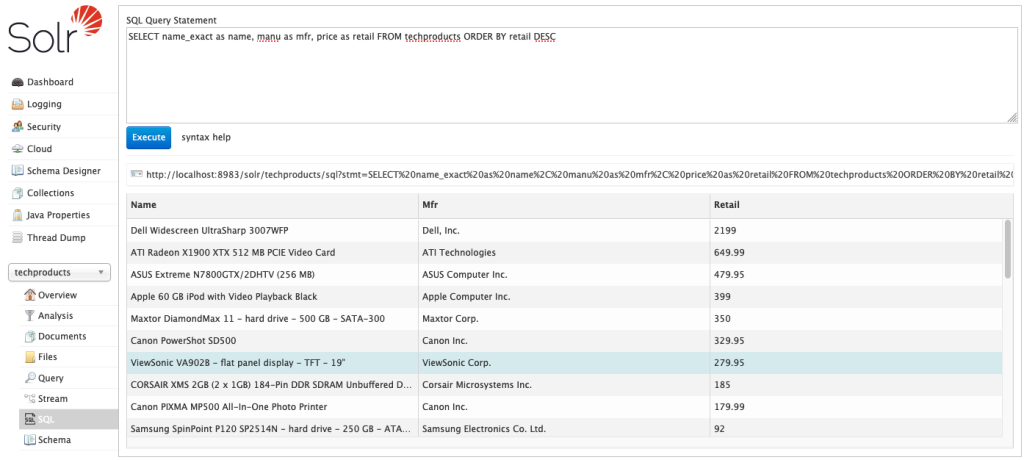
RDBMS is the most widely used among all types of database management system today.
It stores data in tables consisting of rows and columns.
Key Concepts: Tables, Rows, and Columns
- Table = Collection of related data
- Row = Single record
- Column = Attribute of data
- Primary Key = Unique identifier
- Foreign Key = Links tables
SQL and RDBMS
RDBMS uses Structured Query Language (SQL) for data manipulation.
Benefits
- Strong data integrity
- ACID compliance
- Structured schema
- Multi-user support
Drawbacks
- Complex setup
- Expensive enterprise licenses
- Schema rigidity
Popular RDBMS Software
- PostgreSQL
- MySQL
- Microsoft SQL Server
- Oracle Database
RDBMS dominates enterprise systems, banking applications, ERP software, and web platforms.
Also Read: What is SQL & How’s it Different from DBMS
4. Object-Oriented Database Management Systems (OODBMS)
Object-Oriented DBMS (OODBMS) stores data in the form of objects, similar to object-oriented programming languages. It supports concepts like inheritance and encapsulation, making it suitable for applications requiring complex data structures, such as multimedia systems or engineering applications.
Principles of Object-Oriented Databases
- Objects
- Classes
- Inheritance
- Encapsulation
- Polymorphism
Unlike relational databases, OODBMS stores data along with its behavior.
Advantages
- Handles complex data (multimedia, CAD models)
- Seamless integration with OOP languages
- Better performance for object-heavy applications
Challenges
- Lack of universal standard
- Limited widespread adoption
- Higher complexity
Industries and Applications Using OODBMS
- Engineering and CAD systems
- Scientific research
- Multimedia applications
Example:
- ObjectDB
Comparison of DBMS Types
| Feature | Hierarchical | Network | RDBMS | OODBMS |
| Structure | Tree | Graph | Tables | Objects |
| Flexibility | Low | Medium | High | High |
| Scalability | Limited | Moderate | High | Moderate |
| Data Integrity | Basic | Moderate | Strong | Strong |
| Query Language | Procedural | Procedural | SQL | OQL |
Performance Factors
Performance depends on:
- Data volume
- Query complexity
- Indexing
- Hardware resources
- Concurrency control
RDBMS performs best for structured data, while OODBMS excels with complex objects.
Scalability and Flexibility
- Hierarchical and Network DBMS have limited scalability.
- RDBMS supports vertical scaling and clustering.
- Modern systems also support horizontal scaling (especially NoSQL).
Data Integrity and Security
RDBMS offers:
- Constraints
- Role-based access
- ACID transactions
Hierarchical and network databases offer limited integrity enforcement compared to modern relational systems.
Emerging Types in Database Management Systems
NoSQL Databases
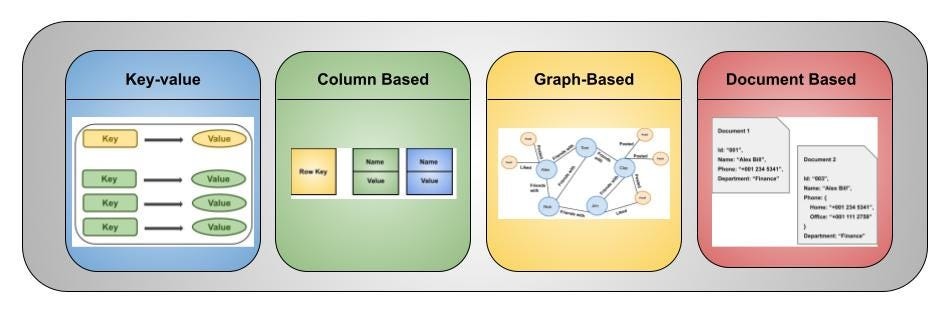
NoSQL DBMS is designed to handle large volumes of unstructured or semi-structured data and to scale horizontally across distributed systems. Unlike relational databases, NoSQL databases do not rely on fixed schemas. They are categorized into document stores, key-value stores, column-family stores, and graph databases. These systems are widely used in big data, real-time analytics, and large-scale web applications.
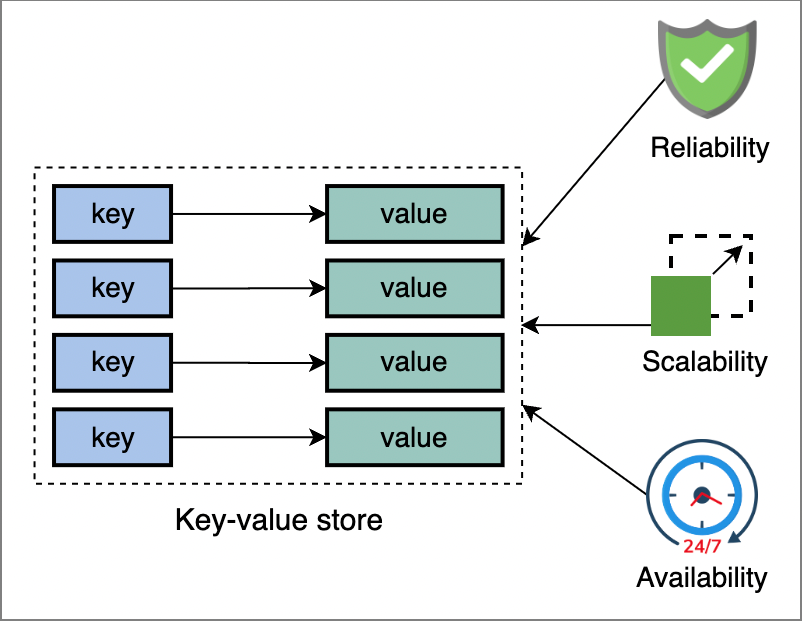
NoSQL databases are designed for big data and flexible schemas.
Types include:
- Document databases (e.g., MongoDB)
- Key-value stores
- Column-family databases
- Graph databases
They provide horizontal scalability and efficiently handle unstructured data.
Cloud-based DBMS
Cloud DBMS refers to databases hosted on cloud infrastructure. They can be relational or NoSQL and provide automated scaling, backup, recovery, and managed services, reducing operational overhead.
- Amazon RDS
- Google Cloud SQL
- Azure SQL Database
Cloud-based systems offer:
- Automatic backups
- Scalability
- Global availability
Big Data and DBMS
Distributed DBMS stores data across multiple physical locations but presents it as a single logical database. This improves availability, fault tolerance, and scalability, especially for global applications.
With the rise of big data, distributed databases and data lakes are increasingly used to process massive datasets.
Technologies like Hadoop and Spark integrate with modern DBMS platforms.
Choosing the Right DBMS for Your Needs
Selecting the right Database Management System (DBMS) is a strategic decision that impacts performance, scalability, security, compliance, and long-term operational efficiency. The ideal choice depends on your data structure, workload type, growth expectations, and regulatory requirements.
Factors to Consider
Data Structure (Structured vs Unstructured)
If your data is highly structured with defined relationships (e.g., financial records, ERP data), a relational database is ideal. For unstructured or semi-structured data like JSON, logs, or multimedia, NoSQL databases offer more flexibility and schema adaptability.
Scalability Requirements
If your system expects rapid growth or high traffic, choose a database that supports horizontal scaling across multiple servers. For stable workloads with moderate growth, vertical scaling in relational systems may be sufficient.
Budget
Managed cloud databases reduce operational effort but may involve recurring subscription costs. On-premise solutions may have higher upfront infrastructure and maintenance expenses but offer more control over long-term costs.
Security Needs
Systems handling sensitive or regulated data require strong encryption, access controls, audit trails, and compliance support. Choose a DBMS with built-in security features and governance capabilities aligned with your regulatory environment.
Transaction Requirements
If your application requires strict consistency and ACID-compliant transactions (e.g., banking or order processing), a relational DBMS is preferable. For applications prioritizing speed and scalability over strict consistency, NoSQL may be suitable.
Integration with Existing Systems
Select a DBMS that integrates smoothly with your current application stack, analytics tools, and cloud infrastructure. Compatibility reduces migration risks and simplifies ongoing maintenance and development.
Assessing Business Requirements
It requires identifying how the system will be used, whether for transaction processing, analytics, reporting, or real-time applications, and determining the level of scalability, availability, and security needed. Stakeholder input from IT, compliance, operations, and leadership teams is essential to ensure the chosen solution aligns with both technical capabilities and strategic objectives.
A thorough assessment minimizes implementation risks, controls costs, and ensures the system can support current needs while remaining adaptable for future expansion.
For example:
- Small business → MySQL
- Enterprise banking → Oracle Database
- Big data analytics → NoSQL
- Multimedia systems → OODBMS
Choosing among the types of databases requires aligning technical capabilities with business goals as well.
Conclusion
The right database decision isn’t about following trends, it’s about aligning technology with your business vision. When you clearly understand your data, growth plans, compliance needs, and operational goals, the choice becomes strategic rather than technical. A well-chosen DBMS doesn’t just store information, it powers performance, ensures security, and drives smarter decisions. Choose wisely today, and you build a foundation that scales confidently into tomorrow.
Form above, the traditional four major types are:
- Hierarchical DBMS
- Network DBMS
- Relational DBMS
- Object-Oriented DBMS
Modern additions like NoSQL and cloud-based systems further expand the database ecosystem.Understanding the different types of databases ensures organizations select the most suitable system for scalability, performance, and security.
While, the future of DBMS lies in:
- AI-powered query optimization
- Cloud-native architectures
- Distributed databases
- Hybrid database models
- Automated scaling
As data continues to grow exponentially, database systems will evolve to become smarter, faster, and more adaptive to modern application needs. Remember choosing the right DBMS today sets the foundation for sustainable digital growth tomorrow.