In the realm of performance testing, Apache JMeter stands out as a powerful tool for generating substantial load to stress-test applications. However, a single JMeter instance may not suffice for large-scale testing scenarios. This is where distributed load testing comes into play, and Docker emerges as a game-changing solution to streamline the process.
Understanding JMeter’s Distributed Testing Architecture
JMeter’s distributed testing setup involves a master instance controlling multiple remote JMeter instances, collectively known as slaves. This architecture allows for the generation of significantly larger loads, pushing applications to their limits.
The Master-Slave Communication
The communication between the JMeter master and slaves relies on Java RMI (Remote Method Invocation), enabling interaction with objects in a distributed network. This setup requires specific port configurations:
- Server port: 1099
- Server RMI local port: 50000
- Client RMI local port: 60000 (for slaves to send results to the master)
By deploying multiple JMeter instances as servers across various machines, testers can scale up the load generation capacity to meet their testing requirements.
Enter Docker: Simplifying JMeter Infrastructure
Docker introduces a paradigm shift in managing JMeter’s distributed testing infrastructure. Unlike traditional virtual machines, Docker allows applications to share the host system’s Linux kernel, resulting in enhanced performance and reduced application size.
Docker’s Role in JMeter Distributed Testing
Setting up numerous JMeter slave machines manually can be a daunting task, especially when dealing with large-scale deployments. Docker simplifies this process by encapsulating the entire JMeter environment, including specific Java and JMeter versions, within a container.
Dockerizing JMeter: A Step-by-Step Approach
The process of Dockerizing JMeter involves creating three essential Dockerfiles:
- JMeter Base Image: This serves as the foundation, containing common elements for both master and slave instances.
- JMeter Client/Master Image: Built upon the base image, it exposes port 60000 for master operations.
- JMeter Server/Slave Image: Also derived from the base image, it exposes ports 1099 and 50000, and runs the jmeter-server on container startup.
Creating the JMeter Environment
With Docker installed, setting up the JMeter distributed testing infrastructure becomes a straightforward process:
- Create slave containers:
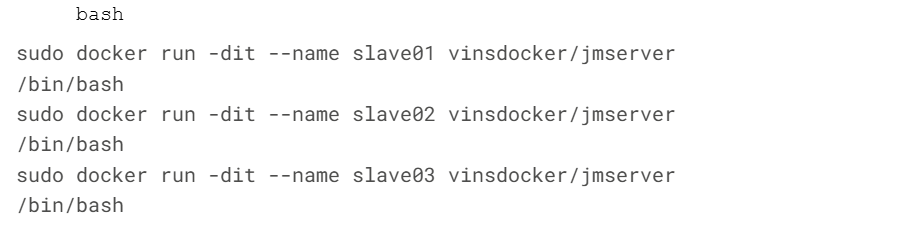
2. Create a master container:

3. Verify running containers:

4. Obtain container IP addresses:

Running Distributed Tests with Docker
Once the Docker containers are set up, executing distributed tests becomes a seamless operation. Here’s how to run a sample test:
- Copy the test file to the master container:

2. Access the master container:

3. Run the distributed test:

This command executes the test across the specified slave containers, distributing the load and aggregating results.
Limitations and Future Considerations
While running multiple JMeter server instances on a single machine doesn’t necessarily increase load generation capacity, the Docker setup demonstrated here serves as a proof of concept. The true power of this approach becomes evident when leveraging cloud computing services like AWS or DigitalOcean, where virtual machines can be provisioned on demand.
Conclusion
Docker has revolutionized the way JMeter distributed load testing infrastructures are created and managed. By encapsulating the entire testing environment in containers, it offers unparalleled flexibility, scalability, and ease of use. As performance testing requirements continue to grow, the combination of JMeter and Docker provides a robust solution for generating massive loads and gaining valuable insights into application performance.
This approach not only simplifies the setup process but also ensures consistency across testing environments, making it an invaluable tool for performance engineers and QA teams alike. As the landscape of performance testing evolves, the synergy between JMeter and Docker is set to play a crucial role in shaping the future of load testing methodologies.
Read more such articles from our Newsletter here.