Key Summary
AWS DevOps is the practice of running DevOps on Amazon Web Services. It covers code, builds, deployments, infrastructure, and monitoring. Here is a simple example. A developer merges a fix into main. CodePipeline starts a release, and CodeBuild runs the tests.
CodeDeploy ships the update to 10% of servers first. CloudWatch watches error rates and rolls back automatically if they spike. The fix reaches every user within minutes. AI now sits inside this loop. AWS DevOps Agent reached general availability on March 31, 2026. It investigates incidents in minutes. Engineers still approve every production fix. Teams see the best results with small releases, infrastructure as code, and alarm-based rollbacks.
What Is The AWS DevOps Model?
The AWS DevOps model puts development and operations in one team. That team owns an application from the first commit to production support. AWS defines DevOps as culture, practices, and tools combined for high-velocity delivery. The AWS version adds managed services for each stage.
Three layers make the model work. People share one backlog and one set of goals. Process moves small, tested changes through CI/CD. Platform services automate every handoff, from CodePipeline to CloudWatch.
What Is The Difference Between DevOps And AWS?
DevOps is a way of working. AWS is a cloud platform where that work runs. DevOps belongs to no vendor. It runs on a data center, Azure, Google Cloud, or AWS. Its core ideas are small batches, automated tests, continuous delivery, and shared ownership of production. AWS supplies compute, storage, networking, and developer tools. Synergy Research Group’s Q2 2026 data puts AWS at 28% of a $143 billion quarterly cloud market. “AWS DevOps” means DevOps practices built on AWS services.
What Are Principles Of AWS DevOps ?
AWS DevOps follows five principles, and each one maps to specific AWS services. Automation comes first. Builds, deployments, and infrastructure all run as code. Collaboration follows, with shared repositories, pipelines, and dashboards.
Small, frequent releases keep risk low. Blue/green and canary deployments make each change easy to reverse. Teams measure progress with DORA’s five delivery metrics, including lead time and change fail rate. Fast feedback closes the loop, as CloudWatch and X-Ray show how each change affects users.
Why AWS for DevOps?
AWS earns its place where teams want managed building blocks for every delivery stage. The eight strengths below explain why.
1. Get Started Fast
Every service is ready once an account exists. There is nothing to install.
2. Fully Managed Services
AWS runs and patches the servers behind CodeBuild, CodePipeline, and CodeDeploy.
3. Built for Scale
The same services handle one instance or thousands. CodeBuild runs builds in parallel, so nothing waits in a queue.
4. Programmable
Every service works through the CLI, SDKs, and APIs. Whole environments live in CloudFormation or CDK code.
5. Automation
Deployments, tests, and configuration run as pipeline steps. Each step runs the same way every time.
6. Secure
IAM sets granular permissions for each person and pipeline stage. CloudTrail records every API call for audits.
7. Large Partner Ecosystem
AWS connects with GitHub, GitLab, Jenkins, Terraform, and Datadog. Teams keep their preferred tools.
8. Pay-As-You-Go
Teams pay only for what they use. There are no upfront fees or long contracts.
When And Why Would I Use AWS DevOps In Real Code?
Use AWS DevOps when your application already runs on AWS. Pipelines, infrastructure, and monitoring then share one account and one permission model. Container microservices are a natural fit. Each service gets its own pipeline to ECS or EKS.
Teams release independently without waiting on each other. Serverless backends fit well too. CodeDeploy shifts 10% of Lambda traffic to a new version first. The rest follows once alarms stay quiet. Regulated workloads are another fit. Banks and healthcare teams keep code, builds, and artifacts inside AWS boundaries.
How AWS DevOps Works?
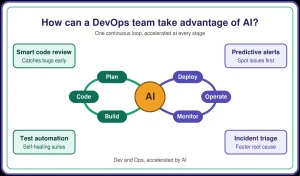
AWS DevOps works as a loop from commit to production and back. Each stage hands off to the next automatically. A developer commits code. CodePipeline detects the change and calls CodeBuild to test it. CloudFormation updates any infrastructure the release needs. CodeDeploy rolls out the new version. CloudWatch and X-Ray then report on production health.
Benefits of AWS DevOps
The loop pays off in speed and stability. Changes move from commit to production in minutes. Alarm-based rollbacks restore service fast after a bad release. Infrastructure as code builds every environment the same way.
What Is AWS DevOps Architecture?
AWS DevOps architecture is the set of services an application runs on. Pipelines can build, change, and scale each one automatically.
1. Load Balancing
Elastic Load Balancing spreads traffic across healthy targets. During blue/green releases, it shifts traffic to the new version.
2. Amazon CloudFront
CloudFront caches content at edge locations near users. Pages load faster.
3. Amazon Security Group
A security group is a virtual firewall. It allows only the ports, protocols, and IP ranges a team defines.
4. Elastic Caches
Amazon ElastiCache keeps frequently read data in memory. Databases handle fewer repeat queries.
5. Amazon RDS (Relational Database Service)
RDS runs managed databases like Aurora, PostgreSQL, and MySQL. AWS handles backups, patching, and failover.
6. AWS Simple Storage Service (S3)
S3 stores objects at any scale. Pipelines use it for build artifacts, logs, and static sites.
7. Amazon Elastic Block Store (EBS)
EBS provides persistent block storage for EC2 instances.
8. Amazon Auto Scaling
Auto Scaling adds instances during traffic peaks. It removes them when demand drops.
What Are The Common Mistakes People Make With AWS DevOps?
- Storing static keys in pipelines. Long-lived access keys leak easily. Use IAM roles and OIDC federation for short-lived credentials.
- Changing resources in the console. Manual edits drift from the templates. Route every change through code, and run drift detection.
- Shipping without a rollback trigger. A release with no alarm keeps rolling out during an outage. Attach CloudWatch alarms to CodeDeploy.
- Pulling unpinned build tools. In March 2026, attackers hijacked the Trivy GitHub Action and stole LiteLLM’s PyPI token. The Cloud Security Alliance documented the full chain. Pin actions and images to commit SHAs.
- Following outdated tutorials. CodeStar and OpsWorks were retired in 2024. Build new setups on CodePipeline and Systems Manager.
Show A AWS DevOps In A Working Code Snippet
This CDK app defines a full pipeline in TypeScript. It tests code from GitHub, deploys a Lambda API to staging, and promotes it after approval.
Deploy it once from a terminal. Every later push to main runs the pipeline automatically.
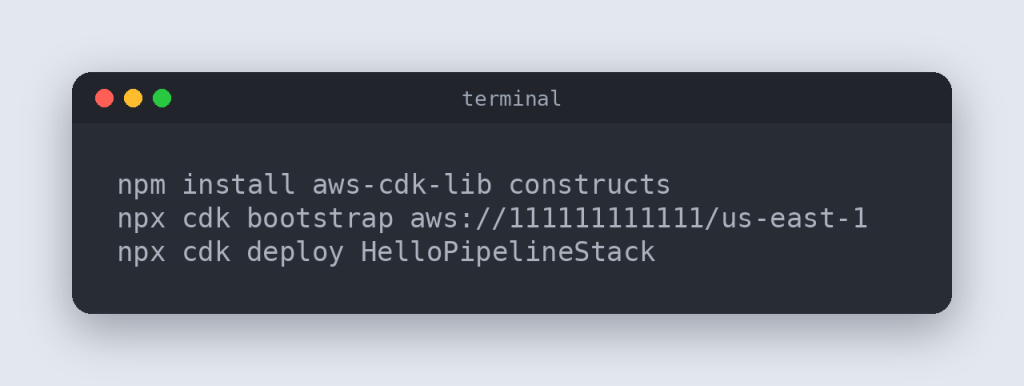
Replace the account ID, region, and connection ARN with your own values.
AWS DevOps Tools
AWS offers a family of developer tools for each delivery stage. These six come up most often.
1. AWS Cloud Development Kit (CDK)
CDK defines infrastructure in TypeScript, Python, Java, C#, or Go. It compiles that code into CloudFormation templates.
2. AWS CodeBuild
CodeBuild compiles code, runs tests, and packages artifacts.
3. AWS CodeDeploy
CodeDeploy releases to EC2, Lambda, ECS, and on-premises servers. It supports rolling, blue/green, and canary strategies.
4. AWS CodePipeline
CodePipeline orchestrates source, build, test, and deploy stages. Each change triggers the full workflow.
5. AWS CodeStar
CodeStar offered one-click project templates until July 31, 2024. Its connection feature continues as AWS CodeConnections.
6. AWS Device Farm
Device Farm tests apps on real phones and browsers hosted in AWS.
How To Implement CI/CD On AWS?
CI/CD on AWS connects four stages inside one CodePipeline workflow. Start with source. Connect GitHub or CodeCommit through CodeConnections. Next, add a CodeBuild project with a buildspec.yml that runs tests. Then add a staging deploy and a manual approval gate.
Finish with a blue/green production deploy that rolls back on alarm. Define the pipeline itself in CDK or CloudFormation.
How Is AWS DevOps Usually Asked In An Interview?
Interviews move from definitions to design to live scenarios. Talent500’s DevOps interview cheat sheet covers the general questions. Screening rounds ask “How do CodePipeline, CodeBuild, and CodeDeploy fit together?” Design rounds go deeper, such as deploying one artifact across three AWS accounts.
Final rounds use live scenarios. A common one: “A release pushed errors to 8%. What do you do first?” Strong answers roll back, confirm recovery in CloudWatch, then investigate. Many roles add microservices questions, which Talent500’s microservices interview guide covers.
Azure DevOps vs. AWS DevOps: How Are They Different?
AWS DevOps is a set of individual AWS services. Azure DevOps is one Microsoft suite with planning, code, and pipelines together.
1. Integration and Ecosystem
AWS DevOps connects natively to AWS compute and IAM. Azure DevOps connects closely to Azure, Entra ID, and GitHub.
2. Tools and Services
AWS offers CodePipeline, CodeBuild, CodeDeploy, and CloudFormation. Azure offers Boards, Repos, Pipelines, Test Plans, and Artifacts.
3. User Interface and Usability
AWS tools each have their own console page. Azure DevOps keeps every tool in one portal.
4. Cost and Pricing Model
AWS bills per use, with no per-user fees. Azure DevOps bills per user, and the first five Basic users are free.
5. Community and Support
Both have large communities. AWS offers the DevOps Engineer Professional certification, and Microsoft offers DevOps Engineer Expert.
What Are The AWS DevOps Tools And Their Use Cases?
Four services form the core of a native AWS pipeline.
1. AWS CodeCommit
CodeCommit hosts private Git repositories secured by IAM. AWS returned it to full availability in November 2025. Regulated teams use it to keep code inside AWS.
2. AWS CodeBuild
CodeBuild runs tests on every commit. A buildspec file in the repository defines each build.
3. AWS CodeDeploy
CodeDeploy updates server fleets in batches. An appspec file defines each deployment step.
4. AWS CodePipeline
CodePipeline links these stages into one automated path. A merge to main can reach production without manual steps.
How To Get Started With AWS DevOps?
Most learners reach a working pipeline in three steps.
Step 1: Learn the Basics of Cloud Computing
Learn the core services first: EC2, S3, VPC, IAM, and Lambda. Add Linux, Git, and Python or Bash.
Step 2: Set Up Your AWS Account
Create an account and turn on MFA for the root user. Sign in through IAM Identity Center. Set a budget alert to catch surprise charges.
Step 3: Understand Key AWS DevOps Tools
Build one project end to end. Use GitHub, CodeBuild, CodeDeploy, CodePipeline, and CloudWatch together.
Infrastructure as Code (IaC) On AWS
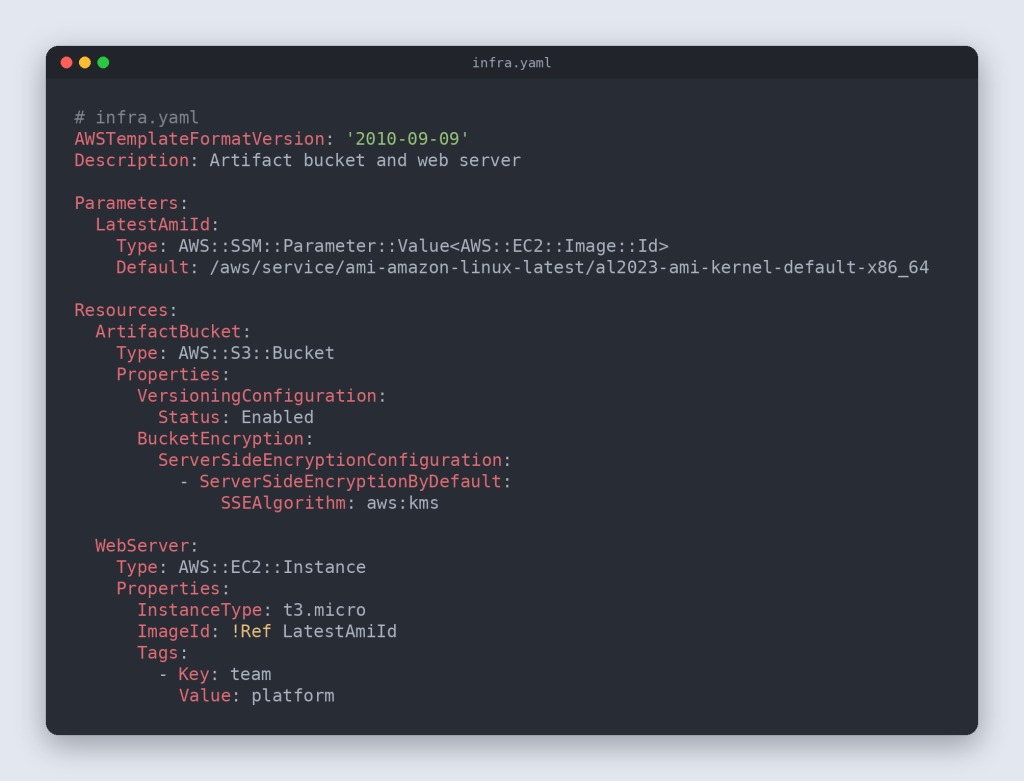
Infrastructure as code defines servers, networks, and permissions in version-controlled files. Pipelines deploy those files like application code.
AWS supports CloudFormation templates, CDK code, and SAM for serverless apps. This template creates an encrypted bucket and a web server.
How To Monitor And Log In On AWS?
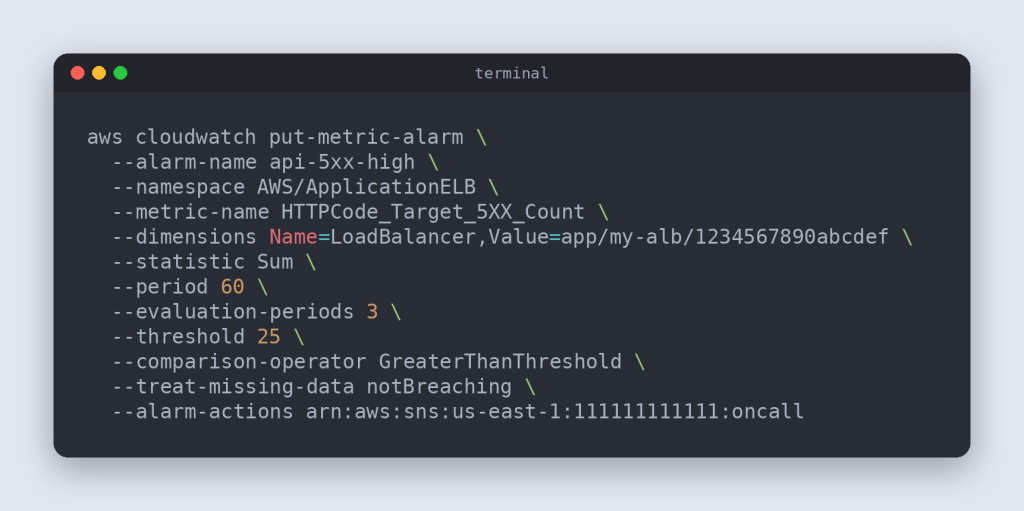
Monitoring on AWS starts with CloudWatch for metrics, logs, and alarms. X-Ray traces requests across services. CloudTrail records every API call. AWS DevOps Agent investigates incidents and suggests a root cause. This alarm pages the on-call team when server errors spike.
What Are The Best Security Practices In AWS DevOps?
The best practice is building security into the pipeline itself. Every change then gets checked automatically.
Give each pipeline stage its own least-privilege IAM role. Store secrets in Secrets Manager and encrypt artifacts with KMS. Scan images with Amazon Inspector before release. Pin third-party actions and sign release artifacts. Turn on GuardDuty, Security Hub, and CloudTrail in every account.
Frequently Asked Questions (FAQs)
These answers cover the questions learners raise most about AWS DevOps.
1. What is AWS DevOps?
AWS DevOps applies DevOps practices using AWS services. Teams automate builds, releases, and monitoring with tools like CodePipeline and CloudWatch.
2. How does AWS support DevOps practices?
AWS provides managed services for every delivery stage. It covers source, builds, deployments, infrastructure as code, and monitoring.
3. What AWS services are commonly used for DevOps?
CodePipeline, CodeBuild, and CodeDeploy handle CI/CD. CloudFormation and CDK handle infrastructure. CloudWatch and X-Ray handle monitoring.
4. What skills are required to become an AWS DevOps engineer?
Start with Linux, Git, and scripting. Then learn core AWS services, CI/CD, infrastructure as code, and containers.
5. What are the benefits of using AWS for DevOps?
AWS offers managed services, pay-as-you-go pricing, and easy scaling. Teams ship faster and recover from failures quicker.