Key Summary
An AWS DevOps agent is an AI service that investigates incidents on AWS. It reads alarms, logs, deployments, and code history. It then names a likely root cause. Picture a CloudWatch alarm at 2 a.m. The agent starts investigating on its own. It maps the failing resources, checks recent releases, and posts findings to Slack. An engineer reads the mitigation plan and decides what runs. AWS DevOps Agent reached general availability on March 31, 2026. Western Governors University cut resolution from an estimated two hours to 28 minutes. Best results come from tagged resources, clean alarms, and small Agent Spaces. The agent recommends. Engineers keep the final call.
What Is The AWS DevOps Agent And What Does It Actually Do?
AWS DevOps Agent is an AI investigator for AWS workloads. AWS calls it a frontier agent. It runs for long stretches without constant human input. It does three jobs. Incident response starts when an alert arrives. Prevention analyzes past incidents and recommends changes. On-demand SRE tasks answer questions about resources, metrics, alarms, and deployments. Users can also build charts and reports in chat. A triage agent adds a fourth job. It rates severity and links duplicate tickets to one investigation. Linked tickets do not start separate investigations. The output is a root cause and a mitigation plan.
The plan lists steps to resolve, validate, and revert a change. An investigation journal records what the agent checked. The agent does not build or ship code, so engineers apply the fix. Two interfaces split the work. Admins configure Agent Spaces in the AWS Management Console. Operators run investigations in the AWS DevOps Agent web app. The agent is also reachable from Slack and connected IDEs. AWS reports preview results from customers and partners. MTTR fell by up to 75% and investigations ran 80% faster. Root cause accuracy reached 94%. Scope extends beyond AWS to Azure workloads and on-premises systems. On-premises resources are discovered through MCP. One investigation can correlate data across clouds, and responses follow the browser locale.
How To Maximize AWS DevOps Agent’s Effectiveness?
Give the agent context and clear boundaries. It investigates through a topology of your resources and their relationships. Teams with consistently named environments get cleaner topology and more useful investigations. Start with Agent Spaces. A space defines the accounts, tools, and users the agent can reach. Versent’s May 2026 review notes AWS advice to keep spaces small and application-focused. One primary account anchors each space. Secondary accounts extend it across an organization. Next, fix discovery. The agent maps CloudFormation stacks by default. Resources from Terraform or the console need tags. Add the same tag key and value to the Agent Space. Connect repositories too. The agent indexes them to look for likely bugs.
Then connect telemetry and code. Supported tools include CloudWatch, Datadog, Dynatrace, New Relic, Splunk, and Grafana. GitHub, GitLab, and Azure DevOps supply deployment history. PagerDuty, ServiceNow, and Slack carry alerts. MCP servers cover everything else. Add your team’s habits next. Skills encode runbooks and architecture standards. Skills can target specific agent types. The agent also learns skills from past investigations. Lock down access. Private connections reach tools inside a VPC without public exposure. Customer managed keys are supported. Okta and Microsoft Entra ID can sign operators in directly.
AWS ships managed policies for each role. Names include AIDevOpsAgentReadOnlyAccess and AIDevOpsOperatorAppAccessPolicy. Start with the narrowest policy that works. Read each conclusion before acting. In one April 2026 public test, the agent flagged an IAM policy. An environment variable held the actual bug. Check each root cause against the evidence. Keep one Agent Space per team or environment. A production space can restrict access to senior engineers. Amazon EventBridge carries investigation events to other systems. Use it to trigger follow-up automation. The web app also lists investigation gaps. They show data the agent could not reach, such as missing log groups.
How Does An AI Agent Fit Into An AWS CI/CD Pipeline?
An AI agent sits beside the pipeline. CodePipeline, CodeBuild, and CodeDeploy still build and ship. The agent watches what they ship.
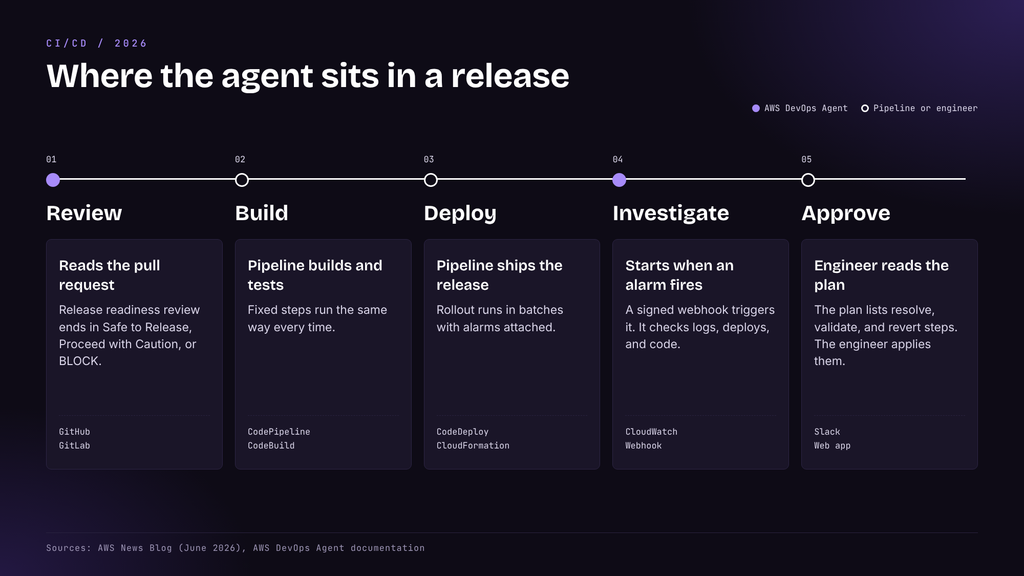
The link is an alert. CloudWatch alarms, PagerDuty webhooks, and ServiceNow tickets can all start an investigation. CloudWatch needs one extra piece. An April 2026 public test found no direct CloudWatch alarm action for it. A small bridge Lambda fills the gap. It passes the alarm name, state, reason, and region as the incident payload. This alarm calls that Lambda when 5xx errors spike. A descriptive alarm name and reason give the agent a sharper starting point.
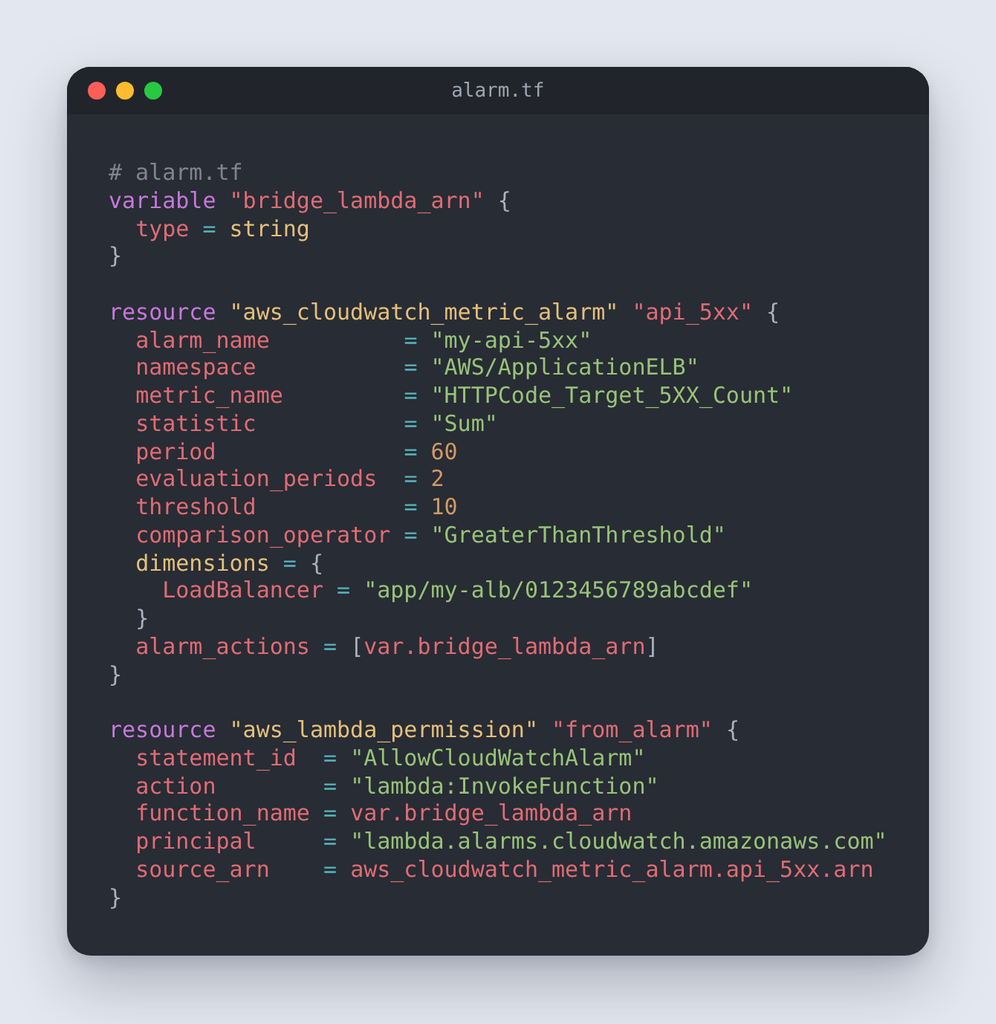
Integrations skip the bridge. Setup generates a webhook for Dynatrace, Splunk, Datadog, New Relic, ServiceNow, and Slack. A generic webhook suits everything else. Generate it in the Agent Space under Capabilities. Each request carries a timestamp header and an HMAC-SHA256 signature. This script sends a test incident.
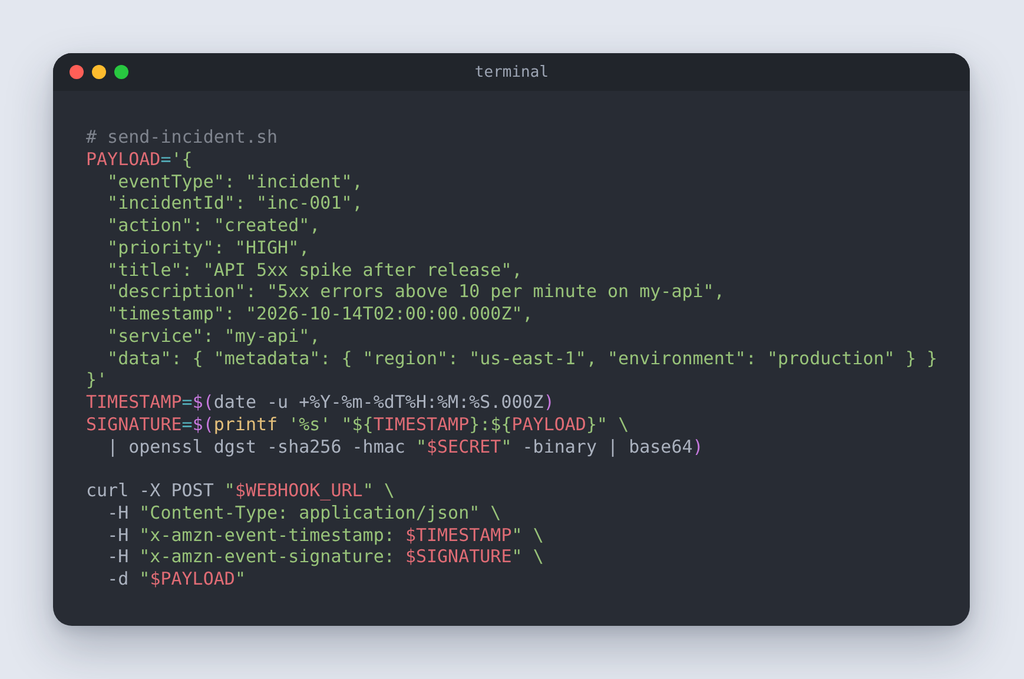
Replace the webhook URL and secret with your own values. Keep each incidentId and timestamp unique. Duplicates are discarded. A 4xx response points to a signature or timestamp problem. A 200 response with no investigation usually means a malformed payload. Release management adds a step before the pipeline. AWS announced it in preview on June 17, 2026. It reviews pull requests on GitHub and GitLab. Findings appear as pull request comments. It checks cross-repository dependency risks and access control changes. Access control changes are measured against Well-Architected best practices.
It also builds and runs the software in an AWS-managed isolated environment. Each review ends in Safe to Release, Proceed with Caution, or BLOCK. Developers can run reviews from the IDE. A Kiro power or a Claude Code plugin handles it. Preview runs in US East (N. Virginia) at no extra cost. AI-written pipelines still need human review. Talent500’s piece on the hidden risks of AI-written DevOps pipelines covers the guardrails.
What’s The Difference Between The AWS CodeDeploy Agent, The CloudWatch Agent, And AI DevOps Agents?
The CodeDeploy agent and the CloudWatch agent run on servers. An AI DevOps agent runs as a managed service. The names match, but the jobs differ.
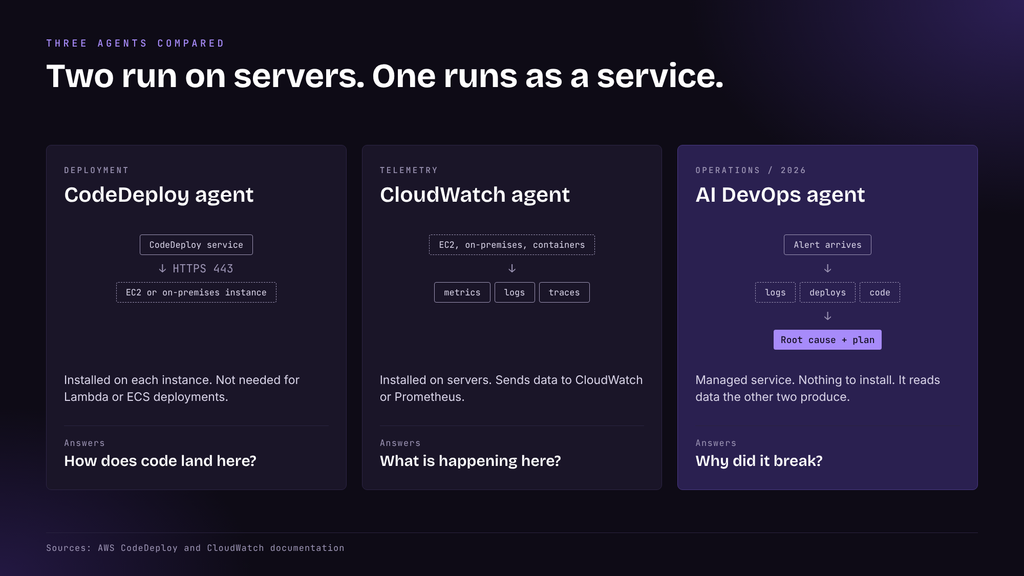
The CodeDeploy agent is software on an instance. It lets that instance join a deployment over outbound HTTPS on port 443. EC2 and on-premises deployments need it, but Lambda and ECS do not. A Rust-based version 2.0.0 is opt-in. On Linux, systemd starts and stops the agent. Version 1.8.x is the minimum supported release.
The CloudWatch agent collects data. It gathers system metrics, logs, and traces from EC2, on-premises servers, and containers. Custom application metrics arrive over StatsD or collectd. Version 1.300025.0 and later collects traces from OpenTelemetry or X-Ray SDKs. Metrics go to CloudWatch, Amazon Managed Service for Prometheus, or both. They bill as custom metrics. The agent is open source under the MIT license. Install it manually or through Systems Manager.
An AI DevOps agent installs nothing and reads telemetry the other two produce. Access runs through an IAM role on the Agent Space. It then reasons across logs, deployments, and code to explain a failure. The three tools work together. The CloudWatch agent supplies data and the CodeDeploy agent delivers releases. The AI agent reads both trails. Each tool answers a different question, so a team usually runs all three.
What Can An AWS DevOps Agent Automate That A Normal Pipeline Can’t?
A pipeline runs fixed steps. An agent handles work that has no fixed script. That work is mostly investigation, triage, and review.
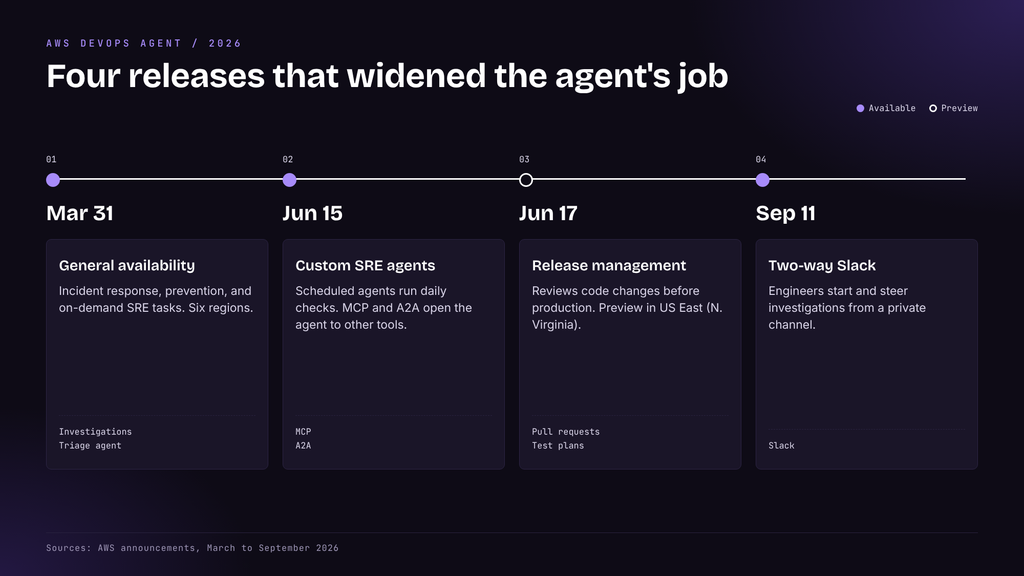
After a failed release, it correlates logs, recent deployments, and CloudTrail events. It points to the change that likely caused the failure. Zenchef reports a change in investigation time. Manual work took one to two hours. The agent takes 20 to 30 minutes. Code indexing lets it suggest fixes at the code level. Custom charts and reports need no dashboard work. Ask in chat, then save and share the result. Triage runs on its own. The triage agent rates severity and links duplicates. Engineers see one investigation per problem.
Between incidents, it studies patterns across past investigations. It recommends changes to monitoring, pipelines, infrastructure, and resilience. Custom SRE agents arrived on June 15, 2026. Teams schedule them to run daily. One example is a database health report that flags slow queries. Another reviews 24 hours of logs for anomalies. MCP and A2A support lets other tools call the agent. The Kiro power checks production health from an IDE. Teams can also attach their own sub-agents. Talent500’s guide to AI agent orchestration explains how such agents coordinate.
On September 11, 2026, AWS added two-way Slack. Engineers mention the agent in a private channel to steer an investigation. Findings and recommended actions land in one thread. Release testing is the newest job. The agent generates change-specific test plans for web and API applications. Tests cover functional correctness, behavioral regressions, and integration scenarios. Each run produces metrics, logs, traces, and an execution summary. Reviews run on pull requests or on demand. The pipeline stays deterministic, and the agent covers the open questions around it. Keep approval gates in the pipeline. The agent informs the decision.
Is An AWS DevOps Agent Worth Using For A Small Team?
It pays off for small teams on AWS with alarms in place. A team with one engineer on call for many services gains the most. Cost tracks usage. AWS bills $0.0083 per agent-second. That is about $30 per hour of active work. A 30-minute investigation costs about $15. Idle time is free. A busy week changes the math. Five 30-minute investigations cost about $75. Ten hours of complex work costs about $300. New customers get a two-month trial. Each trial month includes up to 10 Agent Spaces. Each month also includes 20 hours of investigations. Evaluations get 15 hours. On-demand tasks get 20 hours.
AWS Support customers earn monthly credits. Business Support+ returns 30% of the prior month’s charge. Enterprise Support returns 75%. Unified Operations returns 100%. Set a budget alert, because CloudWatch queries bill separately. Versent’s May 2026 review describes the agent as advisory and read-only. It changes nothing in AWS. That lowers the risk of a first trial. Three signs point to a fit. Engineers get paged outside work hours. Alarms and logs already exist. The same incidents keep returning. Use the trial on real incidents. Compare investigation time against your last three incidents.
Hold back when observability is thin. The agent reasons only over data it can reach. Add alarms, logs, and resource tags first. Six regions support it today. They span the US, Europe, and Asia Pacific, from N. Virginia to Tokyo. The skills also help a career. Learn CloudWatch alarms, IAM roles, Terraform or CDK, and MCP basics. Talent500’s guide to AI for DevOps teams recommends read-only agents first.
Frequently Asked Questions (FAQs)
These answers cover the questions engineers ask most about the AWS DevOps agent.
1. What Is An AWS DevOps Agent?
An AWS DevOps agent is an AI service that investigates incidents on AWS. It correlates alarms, logs, deployments, and code. It then proposes a root cause and a mitigation plan. Engineers decide which steps to apply.
2. How Does An AWS DevOps Agent Work?
Admins create an Agent Space with accounts, tools, and access rules. The agent maps resource topology continuously. An alert starts an investigation. Findings and mitigation steps reach the web app or Slack. Operators can also ask follow-up questions in chat.
3. What Are The Benefits Of Using An AWS DevOps Agent?
Investigations run faster and resolution time drops. Western Governors University went from an estimated two hours to 28 minutes. Teams also get prevention recommendations and a written record of every investigation.
4. How Can AWS DevOps Agents Automate Software Development And Deployment?
The agent does not run deployments. It reviews pull requests, tests changes before merge, and investigates failures after release. Release management is in preview. CodePipeline and CodeDeploy still ship the code.
5. What AWS Tools Can Be Integrated With A DevOps Agent?
CloudWatch, Datadog, Dynatrace, New Relic, Splunk, and Grafana supply telemetry. GitHub, GitLab, and Azure DevOps supply code. PagerDuty, ServiceNow, and Slack handle alerts. MCP servers cover custom tools. Amazon EventBridge carries investigation events.