Cracking Android interviews in 2026 also requires a balance of fundamentals, practical experience, and modern development knowledge. From lifecycle management to architecture patterns, every concept plays a crucial role in building robust applications.
More than just knowing syntax, it demands a strong understanding of architecture, lifecycle management, UI design, and modern development practices. With the growing adoption of tools like Android Jetpack and languages such as Kotlin, companies now expect developers to build scalable, efficient, and maintainable applications.
This guide covers the most important Android interview questions, from beginner-level fundamentals to advanced architectural concepts, helping you prepare with confidence. By preparing strategically and practicing regularly, you can confidently tackle even the toughest Android developer interview questions and land your desired role.
What Do Companies Look for in Android Developer Interviews?
Before diving into questions, it’s important to understand what interviewers evaluate. Companies are not just testing your knowledge, they’re assessing your problem-solving ability and practical experience.
Key areas they focus on:
- Strong understanding of Android fundamentals
- Knowledge of lifecycle and memory management
- Experience with modern architecture (MVVM, Clean Architecture)
- Hands-on experience with APIs and debugging
- Ability to write clean, maintainable code
Basic Android Interview Questions
Android is still the most popular mobile operating system. Android development facilities are in great demand because of their flexibility. If you’re looking for a career in Android development, our interview preparation tool is built to help both novices and seasoned experts get ready. The most commonly asked questions are listed below to help you excel in your interview.
What is Android and how does it work?
Andy Rubin developed Android, an open-source operating system based on Linux that is now one of the most widely used smartphone operating systems worldwide.
Android is an open-source, Linux-based operating system designed primarily for mobile devices. It uses a layered architecture where applications interact with the system through APIs provided by the Android framework.
What are the main components of Android architecture?
As an Android developer, understanding the core components of the Android operating system is essential to building responsive, efficient, and well-structured applications. The four major components building blocks that every Android application relies on are Activities, Services, Broadcast Receivers, and Content Providers.
The Android architecture consists of:
- Linux Kernel (hardware abstraction)
- Libraries and Android Runtime (ART)
- Application Framework (APIs for developers)
- Applications (user-facing apps)
What is an Activity in Android?
An activity provides the window in which the app draws its UI. This window typically fills the screen, but may be smaller than the screen and float on top of other windows. Generally, one activity implements one screen in an app. Activity represents a single screen with a user interface. It acts as the entry point for user interaction and is a core component of Android apps.
What is the Android Manifest file?
The Android Manifest is an XML file which contains important metadata about the Android app. This includes the package name, activity names, main activity (the entry point to the app), Android version support, hardware features support, permissions, and other configurations.
The AndroidManifest.xml file contains essential information about the app, including:
- App components (activities, services, receivers)
- Permissions
- Hardware requirements
It acts as a configuration file for the Android system.
Android Lifecycle Interview Questions
The Activity Lifecycle is a complex state mechanism that powers every tap and swipe in an Android app. Although callbacks like onCreate() and onPause() are frequently used by developers, few are aware of how Android handles these transitions inside. Thus, it is crucial to comprehend the Android lifecycle, but it is much more crucial to grasp how Android maintains it internally, and it is also one of the most critical areas in Android interviews. So let’s explore this,
What is the Activity Lifecycle in Android?
The Activity Lifecycle defines how an activity behaves during different states, such as creation, running, pausing, stopping, and destruction.
What are the key lifecycle methods developers should know?
Important lifecycle methods include:
- onCreate() – Initialization
- onStart() – Activity becomes visible
- onResume() – User interaction begins
- onPause() – Activity partially hidden
- onStop() – Activity no longer visible
- onDestroy() – Cleanup before destruction
Mastering lifecycle handling is crucial to avoid memory leaks and crashes.
Android Development Concepts Interview Questions
This Android interview article is not just for aspiring Android Developers but also for tech entrepreneurs looking to build a next-gen Android application. Here are questions related to basic concepts and core essentials of Android app development, ranging from Android UI, Broadcast Receivers, Content Providers, and more.
These questions test your understanding of core Android concepts, and UI-related questions will further evaluate your ability to design responsive and efficient interfaces.
What is an Intent in Android?
An Intent is a messaging object used to request actions from other components, such as starting an activity or service.
What is the difference between explicit and implicit intents?
- Explicit Intent: Specifies the exact component to start
- Implicit Intent: Describes an action, allowing the system to choose the appropriate component
What are Services in Android?
Services are background components that perform long-running operations without a user interface, such as playing music or fetching data.
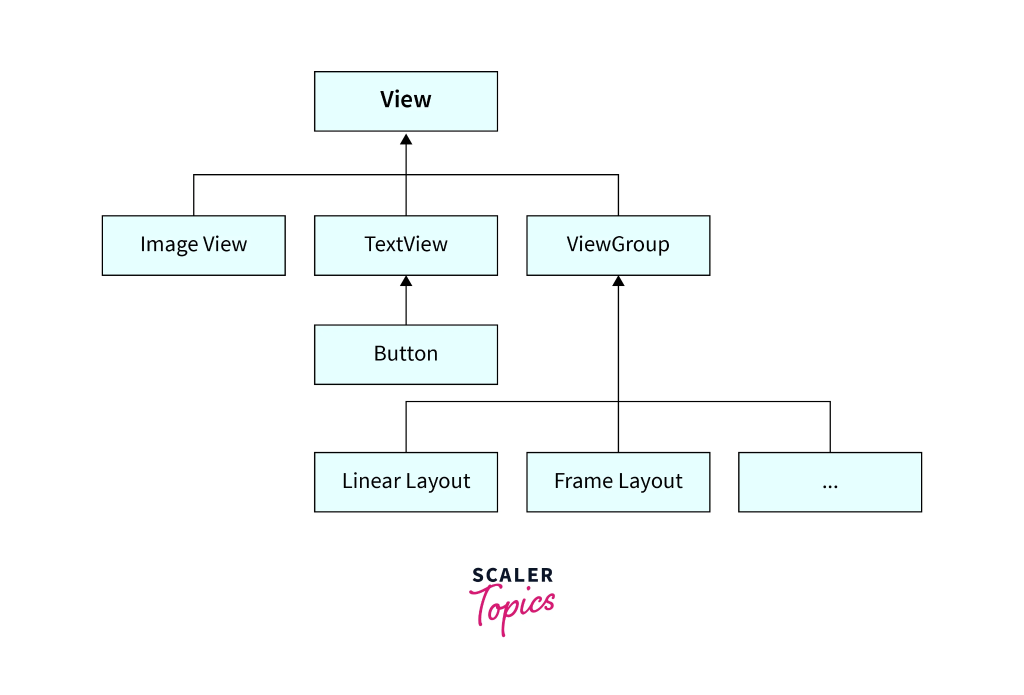
What are layouts in Android?
Layouts define the structure and arrangement of UI elements on the screen. Examples include LinearLayout, ConstraintLayout, and FrameLayout.
What is the difference between LinearLayout and ConstraintLayout?
ConstraintLayout and LinearLayout are two of the most used layout managers. Although each has advantages, ConstraintLayout has become a potent tool for producing adaptable and effective layouts.
- LinearLayout: Arranges elements in a single row or column
- ConstraintLayout: Provides flexible positioning using constraints, reducing nested layouts and improving performance
Android Architecture and Modern Development Questions
Modern Android interviews heavily focus on architecture and Jetpack components. This section will cover most common Android interview questions in particular Android development categories, making sure you have a thorough grasp of every potential area that could be assessed. You’ll be able to approach interviews with confidence by the end of the series, knowing that you’ve addressed every possible question in every category.
What is MVVM architecture in Android?
MVVM (Model-View-ViewModel) separates business logic from UI, making apps more maintainable and testable.
- Model: Handles data
- View: Displays UI
- ViewModel: Connects Model and View
Components:
- Model → Data layer
- View → UI
- ViewModel → Logic & state
Benefits:
ViewModel survives configuration changes
- Clean code
- Easier testing
- Lifecycle-aware
What are ViewModel and LiveData?
These are part of Android Jetpack architecture components and are widely used in modern development.
- ViewModel: Stores UI data and survives configuration changes
- LiveData: Observable data holder that updates UI automatically
Recommendations for Senior Android Developer Roles
Apart from the questions above. Interviewer also expects the you to have a deeper knowledge about a few concepts, if you are applying for the For senior roles, expectations include system design, scalability, and performance optimization. Here are some recommendations
1. Kotlin Coroutines & Structured Concurrency
Kotlin Coroutines are used for managing asynchronous tasks in a simple and efficient way without blocking the main thread.
- They are lightweight compared to threads
- Help in writing asynchronous code in a sequential manner
Key Concepts:
- CoroutineScope → Defines lifecycle
- Dispatcher → Decides thread (Main, IO, Default)
- Job → Controls coroutine lifecycle
- SupervisorJob → Prevents failure from cancelling all child coroutines
Structured Concurrency:
- Ensures all coroutines are tied to a scope
- Prevents memory leaks
- Automatically cancels child coroutines when parent is cancelled
Example: ViewModelScope ensures coroutines are cancelled when ViewModel is cleared
2. Garbage Collection & Memory Leaks
Garbage Collection (GC) automatically frees memory by removing unused objects.
How it works:
- Tracks object references
- Removes objects with no active references
Memory Leaks in Android:
Occurs when objects are still referenced but not needed.
Common Causes:
- Static references to Context
- Long-running background tasks
- Improper lifecycle handling
Prevention:
- Use WeakReference
- Avoid holding Activity context
- Use lifecycle-aware components (ViewModel, LiveData)
3. Immutability is Important
Immutability means objects cannot be changed after creation.
Benefits:
- Thread-safe
- Predictable behavior
- Easier debugging
Kotlin Example:
data class User(val name: String)
val updatedUser = user.copy(name = “New Name”)
Instead of modifying, we create a new object
4. Activity & Fragment Lifecycle
Lifecycle defines how components behave during app usage.
Activity Lifecycle:
- onCreate → Initialization
- onStart → Visible
- onResume → Interactive
- onPause → Partially hidden
- onStop → Not visible
- onDestroy → Cleanup
Fragment Lifecycle:
- Similar but tied to Activity
- Has additional view lifecycle
Handling Configuration Changes:
- Use ViewModel
- Avoid storing UI data in Activity
5. Service vs WorkManager vs Foreground Service
| Component | Use Case |
| Service | Background tasks (no UI) |
| Foreground Service | Critical tasks (music, location) |
| WorkManager | Reliable, scheduled background work |
Best Practice: Use WorkManager for most background tasks
6. RecyclerView & Optimization
RecyclerView efficiently displays large datasets.
How it works:
- Reuses views (ViewHolder pattern)
- Avoids unnecessary inflation
Optimization:
- Use DiffUtil for updates
- Avoid nested layouts
- Use ViewBinding
7. Room Database
Room is an abstraction over SQLite.
Features:
- Compile-time query validation
- Supports LiveData/Flow
- Handles migrations
Transactions:
- Ensures data consistency
- Uses annotations like @Transaction
8. DataStore vs SharedPreferences
| Feature | DataStore | SharedPreferences |
| Async | Yes | No |
| Safe | Yes | No |
| Modern | Yes | No |
DataStore is preferred for new apps
9. WorkManager (Background Tasks)
Used for reliable background work.
Features:
- Works even if app closes
- Supports constraints (network, battery)
- Handles retries
Best for syncing data with server
10. Secure API Calls
- Use HTTPS
- Store tokens securely (Keystore)
- Use interceptors (OkHttp)
- Implement token refresh logic
11. Testing Strategy
- Unit Testing → Business logic
- UI Testing → Espresso/Compose
- Use mocks/fakes
Best Practice:
- Dependency Injection improves testability
12. Doze Mode
Doze mode restricts background activity to save battery.
Impact:
- Delays background tasks
- Restricts network
Solution:
- Use WorkManager
- Use high-priority FCM if needed
13. System Design (Mobile)
For scalable apps:
- Use modular architecture
- Implement offline-first strategy
- Use caching + sync
- Feature flags for rollout
How InterviewIQ Helps You Prepare for Android Interviews
Platforms like InterviewIQ can significantly improve your preparation by offering structured learning paths and real-world interview simulations. It helps students prep answers once, see them exactly when students need them in interviews. AI enablement shows quick bullet points from your resume to spark your memory.
With InterviewIQ, you can:
- Practice real interview questions
- Get personalized feedback
- Improve coding and problem-solving skills
- Prepare for both beginner and senior-level roles
Frequently Asked Questions
What are the most common Android interview questions?
Common questions include topics like Activity lifecycle, intents, services, layouts, and architecture patterns like MVVM.
How do I prepare for an Android developer interview?
- Revise fundamentals and lifecycle concepts
- Practice coding and debugging
- Build real-world projects
- Study modern tools like Jetpack and Kotlin
What skills are required for Android developers?
- Strong Java/Kotlin knowledge
- UI/UX design understanding
- API integration
- Problem-solving skills
- Knowledge of architecture patterns
How important is Android architecture knowledge in interviews?
Very important, especially for mid-level and senior roles. Companies expect developers to build scalable and maintainable applications using modern architecture principles.