Businesses can no longer avoid investing in a mobile app because smartphones are becoming the preferred tool for shopping, task management, and service access. However, a thorough grasp of the mobile app development lifecycle is necessary to produce a successful app.
Writing code is only one aspect of creating a successful mobile or web application; another is adhering to a methodical, planned process that turns a concept into a useful, scalable, and user-friendly product. The app development lifecycle is the name given to this methodical process.
Large enterprises and startups heavily rely on applications to provide value, engage users, and maintain their competitiveness in the fast-paced digital world of today. But without a clear lifecycle, projects can easily spiral out of control, resulting in missed deadlines, overspending, and subpar user experience.
To help you create apps effectively and successfully, this thorough guide will take you through every phase of the application development life cycle, from inspiration to deployment and beyond. Understand the mobile app development lifecycle to develop a high-performing app. Test your app on real devices with BrowserStack to ensure a good user experience.
What Is the App Development Lifecycle?
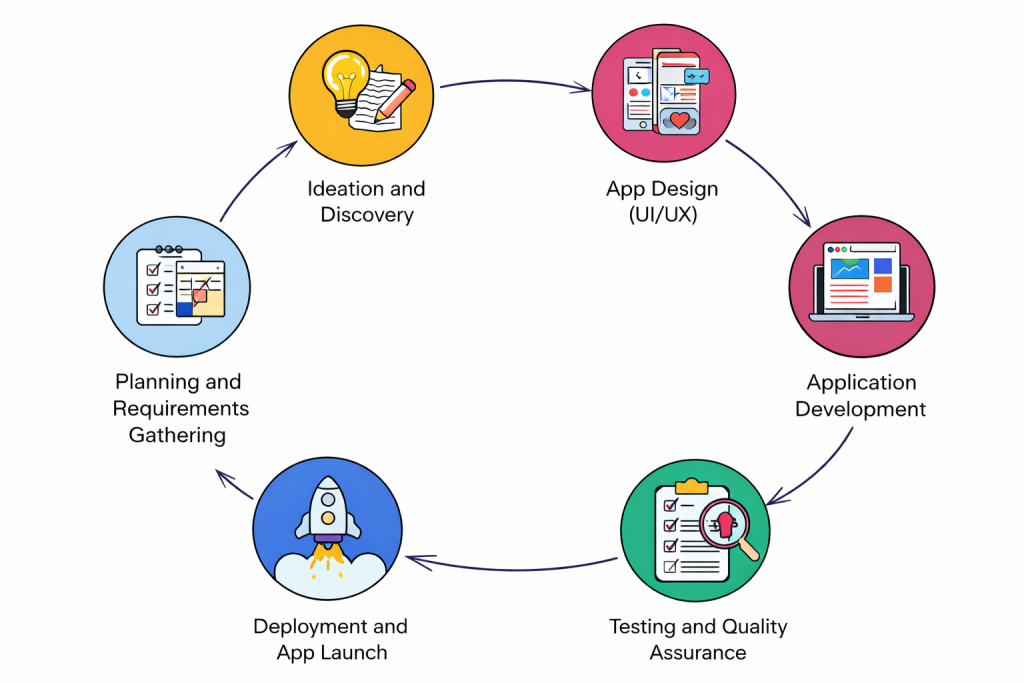
The application development life cycle (ADLC), also known as the software development life cycle (SDLC), consists of six phases: discovery, design, development, testing, release, and maintenance. Contributions from product managers, UX/UI designers, and developers are required to ensure each phase is carried out successfully. Development models like agile, waterfall, and DevOps can be employed to carry out the ADLC.
The app development lifecycle (ADLC) is a step-by-step process used to design, develop, test, and deploy applications. It provides a structured framework that ensures all aspects of development are planned and executed systematically.
Unlike ad-hoc development approaches, the lifecycle focuses on planning, collaboration, and continuous improvement, helping teams deliver high-quality applications that meet user expectations.
Why the App Development Lifecycle Is Important
The way your application adds value for users is greatly influenced by the application development life cycle. Maintaining a clear framework for developing, testing, and distributing software fosters team trust and contributes to the project’s successful completion. It’s crucial that every member of the application team comprehends and adheres to the life cycle with discipline in order to enforce ADLC; this is not simply the responsibility of a product manager.
The mobile app development lifecycle also plays a critical role in ensuring project success. It helps teams stay aligned, reduces risks, and improves overall efficiency.
Key reasons why it’s important:
- Ensures clear direction and defined goals
- Reduces development errors and rework
- Improves communication among stakeholders
- Enhances product quality and user experience
- Helps manage time and budget effectively
Without a structured lifecycle, even the best ideas can fail due to poor execution.
Key Stages of the App Development Lifecycle
The app development lifecycle is divided into several stages, each serving a specific purpose. Organizations mainly follow a process to deliver applications on time. You should separate this process into the following phases. These stages work together to ensure smooth development and successful delivery.
Stage 1: Ideation and Discovery
This is the foundation of the entire lifecycle. The ideation stage focuses on transforming a raw idea into a clear concept with well-defined objectives.
Teams explore market gaps, user needs, and business goals to ensure the idea is viable and valuable.
Identifying the Problem and Target Users
Every successful app solves a real problem. At this stage, you must clearly define:
- What problem is your app solving
- Who your target audience is
- What value will your app deliver
Understanding user needs helps shape the entire development process.
Market and Competitor Research
Before building an app, it’s essential to analyze the market:
- Identify existing competitors
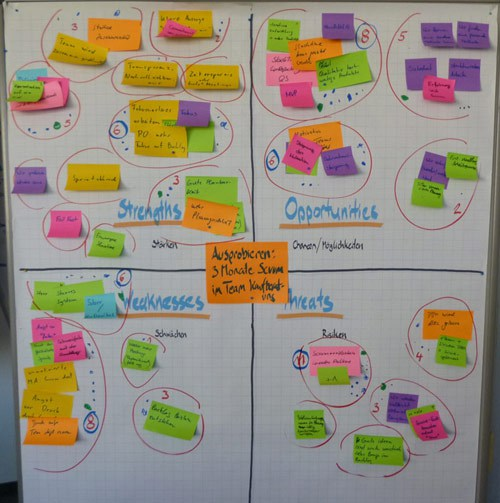
- Study their strengths and weaknesses
- Find gaps and opportunities
This research ensures your app stands out and delivers unique value.
Stage 2: Planning and Requirements Gathering
Once the idea is validated, the next step is detailed planning. It’s structured into clear requirements. This stage defines what the app should do and how it should function, and converts concepts into actionable requirements.
Defining App Features and Scope
Here, you define:
- Core features (MVP – Minimum Viable Product)
- Additional functionalities
- Project scope and limitations
A clear scope definition prevents feature creep and keeps the project on track.
Choosing the Technology Stack
Selecting the right technologies is crucial for performance and scalability. This includes:
- Programming languages (e.g., Kotlin, Swift, JavaScript)
- Frameworks and libraries
- Backend infrastructure and databases
The right tech stack ensures long-term success and maintainability.
Stage 3: App Design (UI/UX)
Design is not just about aesthetics; it’s about creating a seamless user experience. Design focuses on how the app looks and feels. The goal is to create an intuitive, engaging, and user-friendly experience.
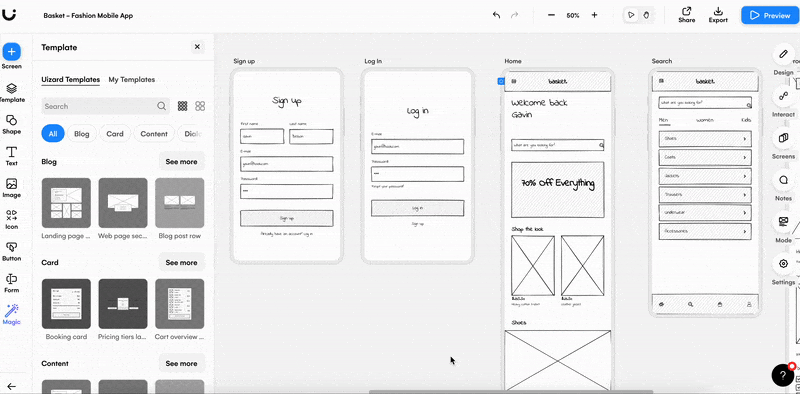
Creating Wireframes and User Flows
Wireframes are basic layouts that define the app’s structure. User flows map how users navigate through the app.
This step ensures:
- Logical navigation
- Clear user journeys
- Efficient interaction design
Building Interactive Prototypes
Prototypes simulate the actual app experience. They allow stakeholders to:
- Visualize the app before development
- Test usability
- Gather early feedback
This reduces costly changes later in development.
Stage 4: Application Development
This is where the actual coding begins. The development phase transforms designs into a working application.
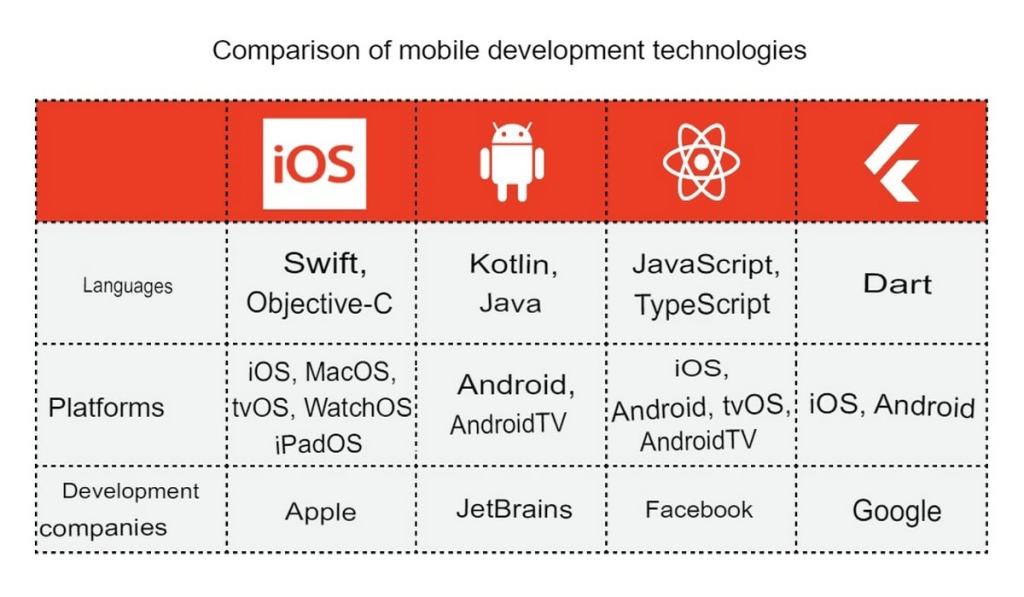
Frontend and Backend Development
- Frontend development: Focuses on UI and user interaction
- Backend development: Handles server logic, databases, and APIs
Both must work seamlessly together for optimal performance.
Integrating APIs and Databases
Modern apps rely heavily on integrations:
- Third-party APIs (payments, maps, authentication)
- Database systems for storing and retrieving data
Efficient integration ensures smooth functionality and scalability.
Stage 5: Testing and Quality Assurance
Testing is a critical phase that ensures the app is reliable, secure, and bug-free.
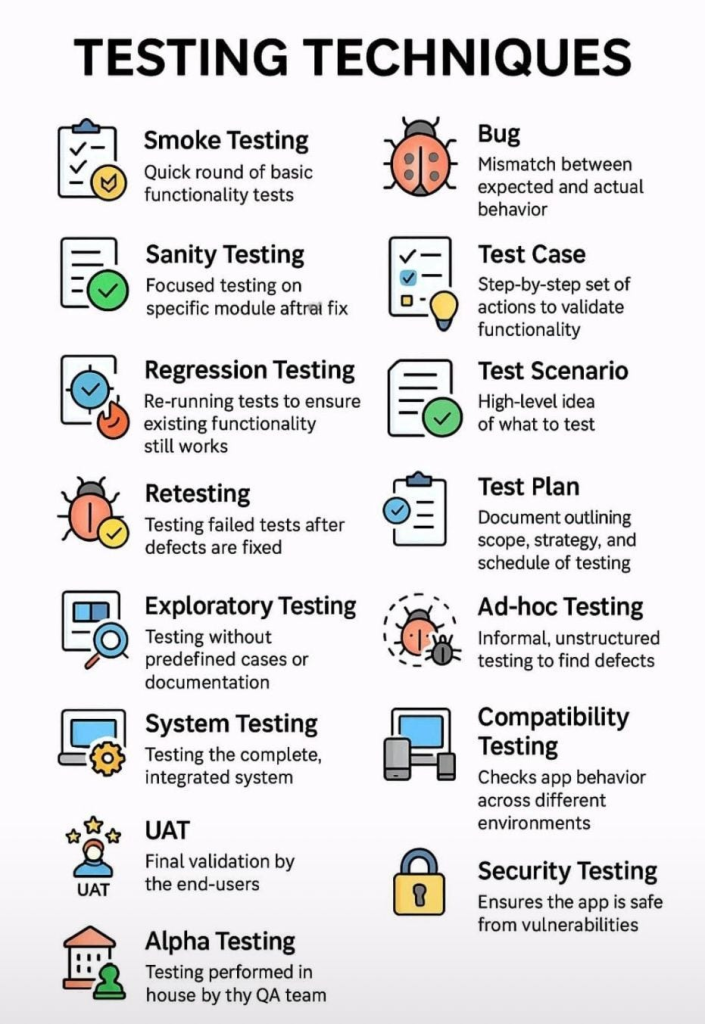
Functional and Performance Testing
- Verifies that all features work correctly
- Ensures the app performs well under different conditions
Security and Compatibility Testing
- Protects user data and prevents vulnerabilities
- Ensures compatibility across devices, OS versions, and screen sizes
Thorough testing minimizes risks after launch.
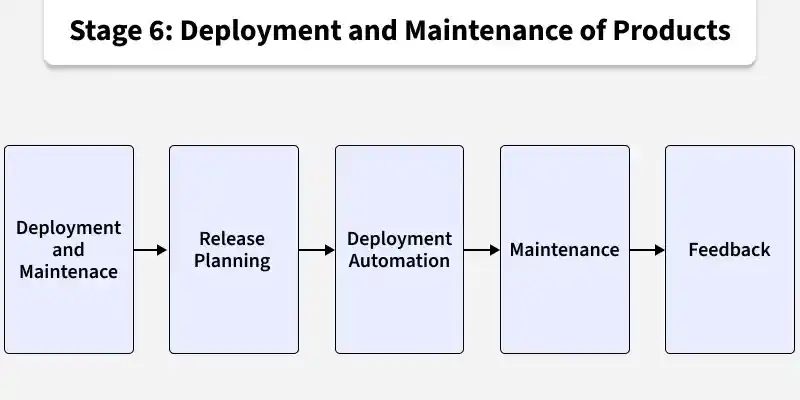
Stage 6: Deployment and App Launch
After successful testing, the application is released to users. This stage ensures smooth deployment and accessibility.
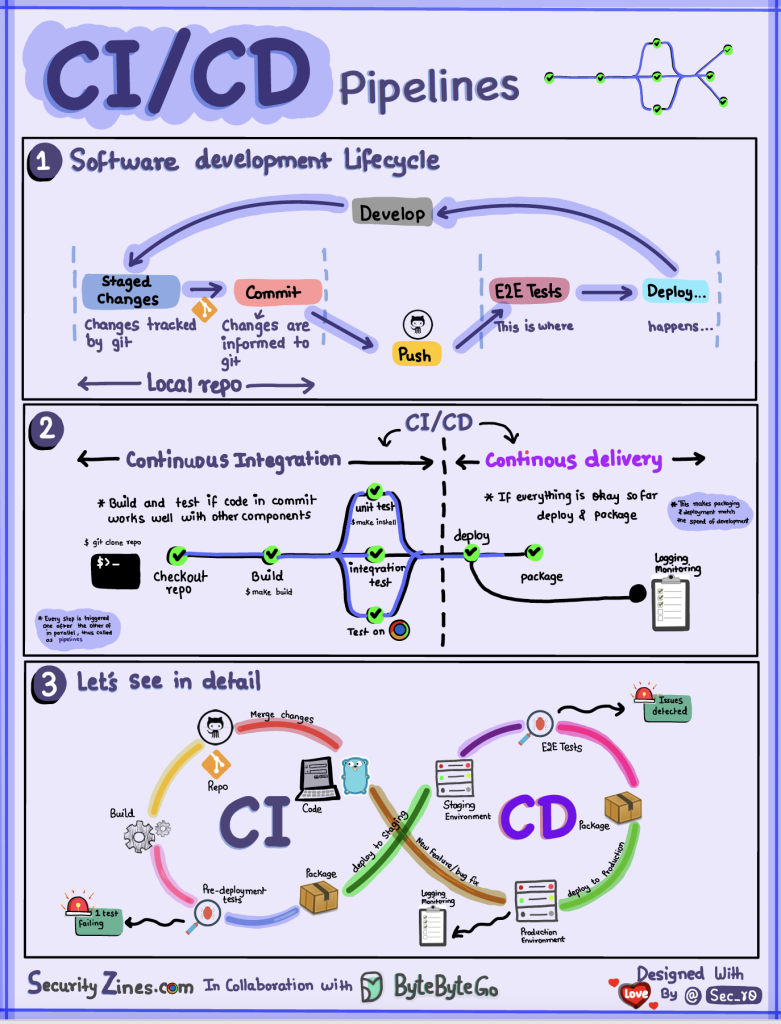
Preparing for App Store Submission
This involves:
- Meeting platform guidelines (Google Play, App Store)
- Creating app descriptions, screenshots, and metadata
- Ensuring compliance with policies
Launch Strategy and Monitoring
A successful launch requires planning:
- Marketing campaigns
- User onboarding strategies
- Monitoring performance metrics
The launch phase sets the tone for user adoption.
Stage 7: Maintenance and Continuous Updates
The lifecycle doesn’t end after deployment. Continuous improvement is essential for long-term success. Post-launch, the app is continuously monitored and improved to meet evolving user needs and fix issues.
Bug Fixes and Performance Improvements
- Address user-reported issues
- Optimize app performance
- Ensure stability
Feature Updates and User Feedback
- Add new features based on user needs
- Improve usability
- Stay competitive in the market
Regular updates keep users engaged and satisfied.
Common Challenges in the App Development Lifecycle
Despite a structured process, teams often face challenges. These may include unclear requirements, scope creep, communication gaps, or technical limitations. Managing expectations, maintaining documentation, and encouraging collaboration help reduce these risks.
As Continuous Integration and Continuous Deployment (CI/CD) have become integral to software development, their importance in mobile app projects is even more pronounced due to the common app lifecycle problems that teams face in the iOS and Android ecosystems. In this article, we explore how Appcircle addresses key mobile app development challenges.
Unclear requirements
Dealing with ambiguous or insufficient requirements is by far one of the most common software development difficulties. Like in 99% of software development scenarios, you’ll discover that beginning frequently entails handling unclear or ever-changing client expectations
Scope creep
When new features are asked for after the original development goals have been set, scope creep happens, which impedes progress, delays delivery, and raises expenses. Changing stakeholder demands, market rivalry, or the inevitable desire to expand the product’s capability beyond its initial scope are common causes of this problem.
Poor communication
Poor communication is one of the most common and costly challenges in application development. When teams (developers, designers, QA, stakeholders) are not aligned, it leads to confusion, delays, and subpar outcomes.
Attempting to finish too much work in too short a time invariably results in many issues and lowers the software’s quality. Unrealistic timeframes might cause the development team to hurry through important tasks, which can result in inadequate testing, missed defects, and badly executed features.
Common Causes
1. Unclear Requirements
When requirements are vague or incomplete, developers may interpret them differently, leading to mismatched expectations.
2. Lack of Cross-Team Collaboration
Silos between teams (e.g., design vs development vs QA) prevent smooth information flow.
3. Ineffective Documentation
Missing or outdated documentation creates dependency on assumptions instead of clarity.
4. Time Zone & Remote Work Barriers
Distributed teams often struggle with delayed responses and misalignment.
5. Overuse of Technical Jargon
Non-technical stakeholders may not fully understand discussions, causing gaps in decision-making.
Budget constraints
Budget overruns happen when the actual cost of development exceeds the planned budget. This is often due to poor planning, changing requirements, or inefficiencies during execution.
Common Causes
1. Scope Creep
Uncontrolled addition of features or changes without adjusting the budget or timeline.
2. Inaccurate Estimation
Underestimating time, resources, or technical complexity at the planning stage.
3. Poor Communication
Misalignment between stakeholders leads to rework and wasted effort.
4. Frequent Requirement Changes
Constant changes disrupt workflow and increase development time.
5. Technical Challenges
Unexpected bugs, integrations, or scalability issues increase costs.
Integration issues
Integration issues arise when different systems, tools, or APIs fail to communicate or work seamlessly together. In modern app development, where multiple services are interconnected, this becomes a critical challenge. Identifying these challenges early helps in managing them effectively.
Why Integration Fails
1. Incompatible Systems
Legacy systems vs modern apps → mismatch in architecture, formats, or protocols
2. Poor API Documentation
Incomplete or unclear documentation leads to incorrect implementation
3. Data Format Inconsistencies
Different systems use different formats, → causes errors and data loss
4. Dependency on Third-Party Services
External APIs may:
- Change unexpectedly
- Have downtime
- Introduce latency
5. Lack of Testing Across Systems
Integration is often tested too late → issues appear just before release
You may also like: 5 most commonly found types of bugs and how to fix them
Best Practices for Managing the App Development Lifecycle
To ensure success, follow these best practices:
- Adopt agile methodologies for flexibility
Agile helps teams stay flexible and responsive to change while maintaining control over progress.
- Maintain clear documentation
Clear documentation is the backbone of successful application development. It ensures that everyone; developers, QA, stakeholders, works with the same understanding, reducing confusion, rework, and delays.
What Good Documentation Includes
1. Requirements Documentation
Clearly defines:
- Features and functionalities
- User stories and acceptance criteria
- Business goals
2. Technical Documentation
Covers:
- System architecture
- APIs and integrations
- Database structure
3. Process Documentation
Includes:
- Workflows and SOPs
- Testing processes
- Deployment steps
4. Change Logs & Version History
Tracks:
- Updates and modifications
- Feature releases
- Bug fixes
Prioritize user-centric design
A successful app solves real user problems. Design should focus on usability and experience, not just aesthetics.
Conduct regular testing
Testing should not be a final step; it should happen throughout the lifecycle.
Encourage collaboration across teams
Clear and consistent communication keeps teams aligned and reduces costly misunderstandings. A disciplined approach leads to better outcomes and faster delivery.
Lastly,
Managing the app development lifecycle effectively is about balance, between speed and quality, flexibility and control, innovation and compliance.
The mobile app development lifecycle provides a clear roadmap for turning ideas into successful applications. By following a structured approach, from ideation to continuous updates, teams can build apps that are not only functional but also scalable and user-friendly.
In a competitive digital landscape, mastering the app development lifecycle is essential for delivering high-quality applications that stand out and succeed.
Teams that focus on clarity, collaboration, and continuous improvement are the ones that consistently deliver successful applications.
Frequently Asked Questions
What are the main stages of the app development lifecycle?
The main stages include ideation, planning, design, development, testing, deployment, and maintenance.
How long does the app development lifecycle take?
It depends on the complexity of the app. Simple apps may take a few months, while complex applications can take a year or more.
What tools are used in app development?
Common tools include Android Studio, Xcode, Figma, Git, Firebase, and various testing frameworks.
What is the difference between SDLC and ADLC?
The Software Development Lifecycle (SDLC) is a broader process used for all types of software, while the App Development Lifecycle (ADLC) is specifically focused on mobile and web applications.