The standards for UI development have increased. These days, without a well-designed user interface that incorporates motion and animation, we are unable to create an application that satisfies user demands. When the present UI Toolkit was developed, these needs were nonexistent. Now it requires a cutting-edge UI toolkit that prepares app developers for success in this new environment, to overcome the technical difficulties of producing a polished UI fast and effectively.
Keeping up with best practices and the rapidly evolving modern android development can be challenging. This is where Android Jetpack comes in, a comprehensive suite of libraries, tools, and guidelines designed to simplify app development and improve code quality.
Whether you’re a beginner or an experienced developer, understanding Android Jetpack is essential for building scalable, maintainable, and high-performance apps.
What Is Android Jetpack?
Android Jetpack is a set of software components and tools provided by Google that help developers build high-quality Android apps more easily. It helps you with tasks like handling data, managing user interactions, and improving app performance.
Jetpack is not a single library; it’s a suite of components grouped into categories like architecture, UI, behavior, and foundation.
These software components help in:
- Following the best practices and writing the boilerplate code.
- Making complex things very simple.
Earlier, there were many challenges, which are as follows:
- Managing activity lifecycles.
- Surviving configuration changes.
- Preventing memory leaks.
All these major problems have been solved by the Android Jetpack’s software components.
So, the solution for all the problems is Android Jetpack.
Another important thing about the Jetpack is that it gets updated more frequently than the Android platform, so that we always get the latest version.
Jetpack comprises the androidx. package libraries, unbundled from the platform APIs. This means that it offers backward compatibility.
Why Android Jetpack Is Important for Modern Android Development
Android apps today need to support multiple screen sizes, lifecycle states, and device configurations. Jetpack addresses these challenges by providing standardized, production-ready solutions. Android Jetpack components are a collection of libraries that are individually adoptable and built to work together while taking advantage of Kotlin language features that make us more productive.
These software components have been arranged in 4 categories, which are as follows:
- Foundation Components
- Architecture Components
- Behavior Components
- UI Components
With Jetpack, developers can:
- Focus more on business logic instead of boilerplate code
- Build apps that are lifecycle-aware
- Ensure better performance and maintainability
- Follow recommended architecture patterns
Key Benefits of Using Android Jetpack
Android Jetpack empowers developers to build high-quality, scalable, and maintainable Android applications faster. By combining modern architecture, powerful tools, and official support, it has become an essential part of the Android development ecosystem.
Key Benefits of Using Android Jetpack
1. Faster Development with Ready-Made Components
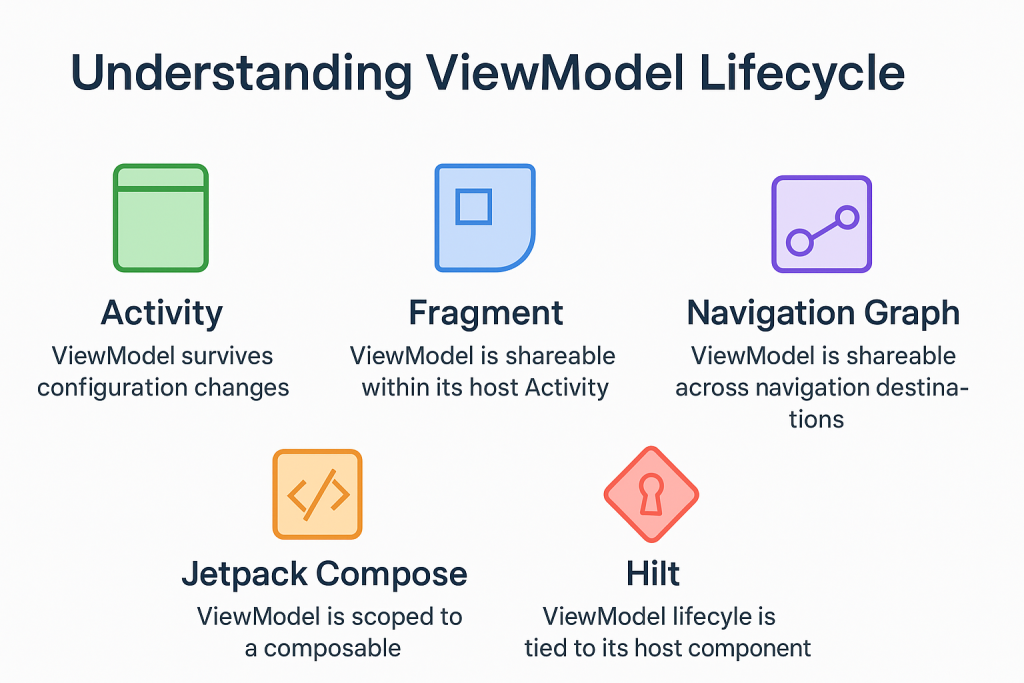
Android Jetpack provides a collection of pre-built, production-ready components that reduce the need to write boilerplate code. Features like Navigation, ViewModel, and LiveData help developers focus on business logic instead of reinventing common functionalities, significantly speeding up development cycles.
2. Improved Code Quality and Maintainability
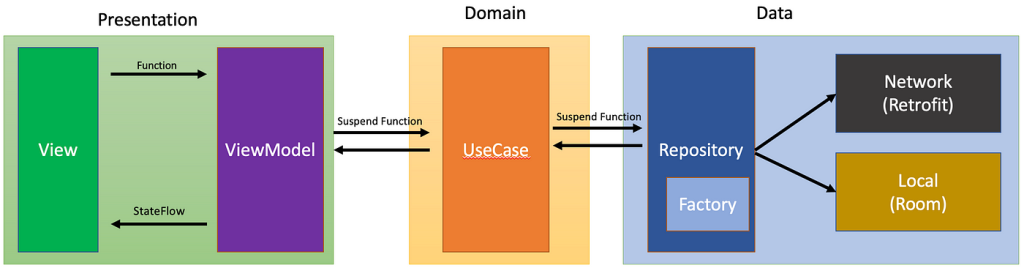
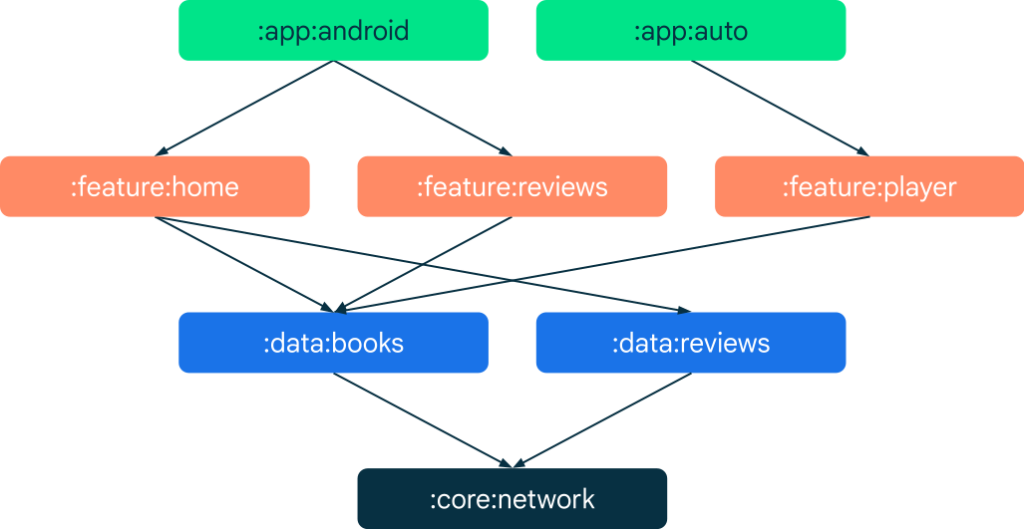
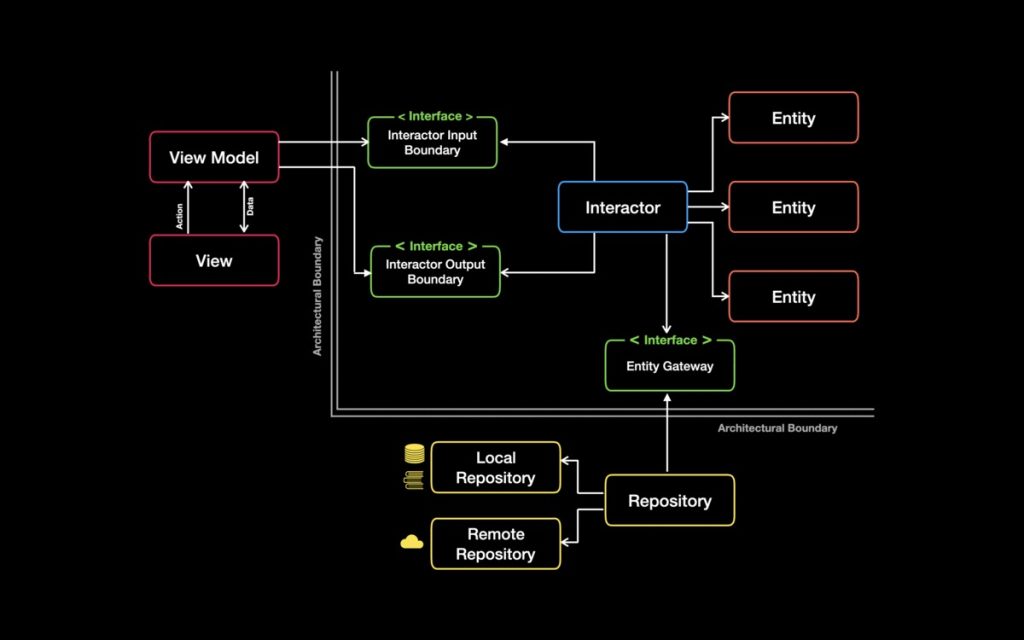
Jetpack encourages modern architectural patterns like MVVM (Model-View-ViewModel), making code more organized and easier to maintain. By separating concerns, teams can scale applications without creating complex, tightly coupled codebases.
3. Lifecycle Awareness
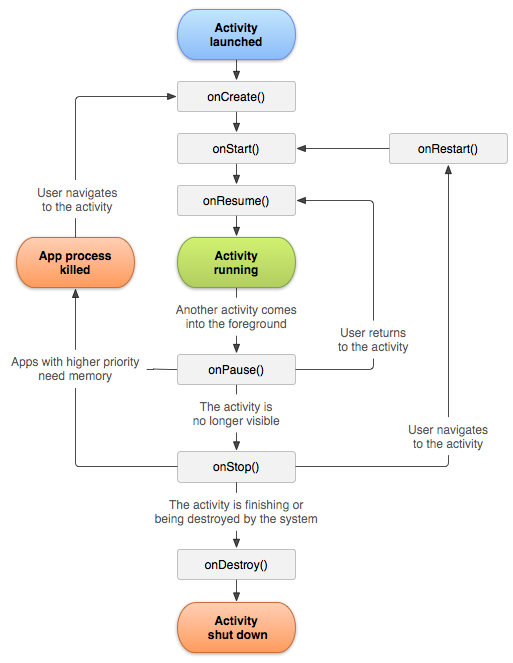
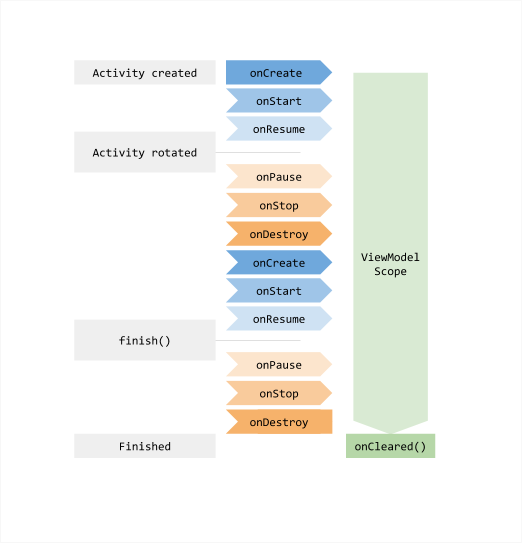
Jetpack components are lifecycle-aware, meaning they automatically adjust based on the app’s state (like screen rotation or backgrounding). This reduces bugs such as memory leaks and crashes caused by improper lifecycle handling.
4. Seamless UI Development with Jetpack Compose
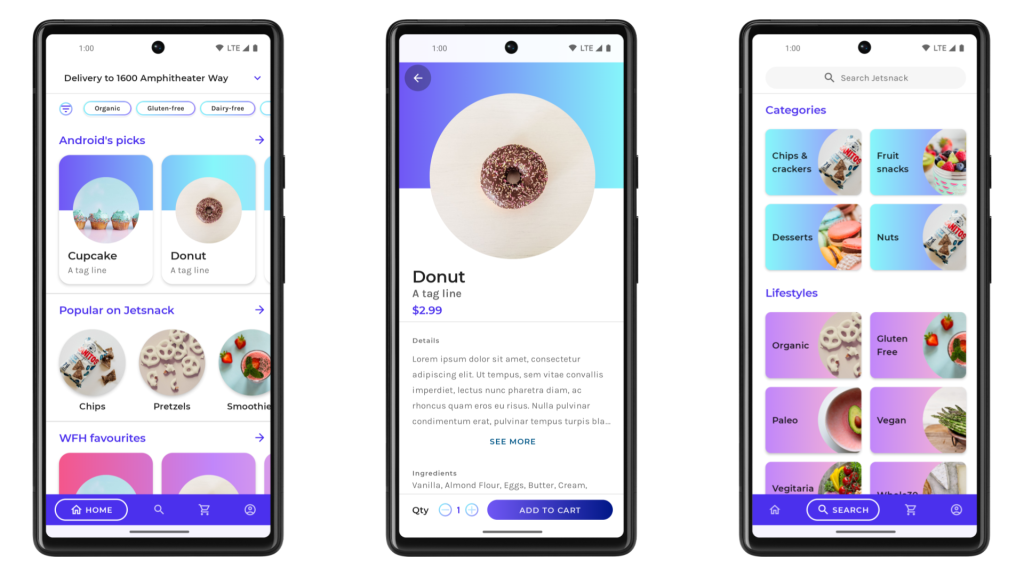
With Jetpack Compose, developers can build modern, responsive UIs using a declarative approach. It simplifies UI development, reduces XML usage, and enables faster iteration with real-time previews.
5. Better App Performance
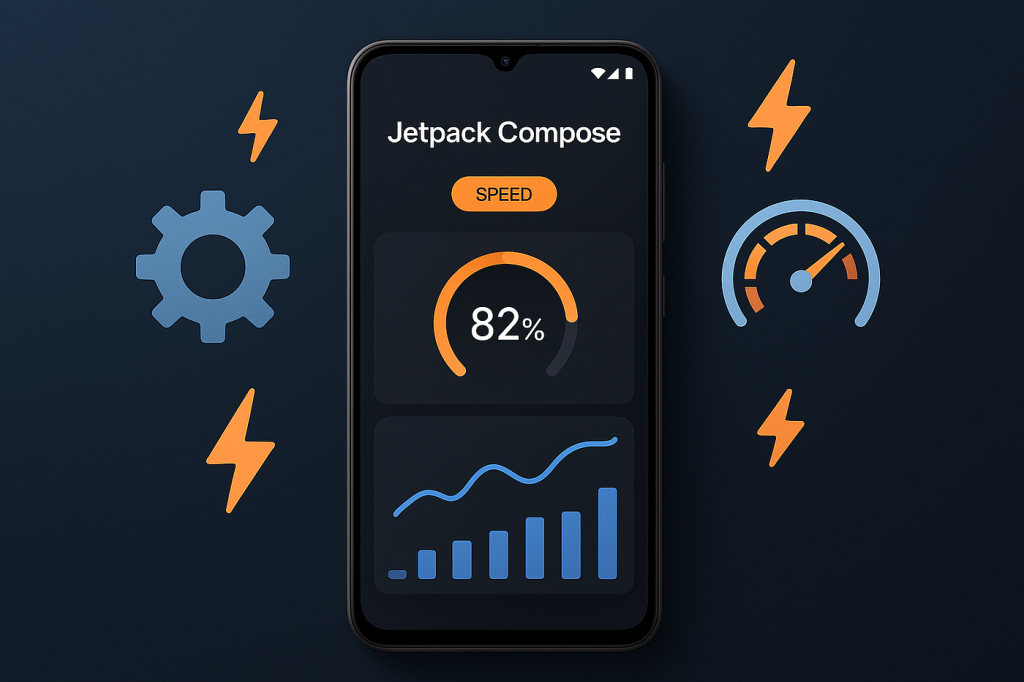
Jetpack libraries are optimized for performance and follow best practices recommended by Google. Components like Paging and WorkManager ensure efficient data loading and background processing, improving overall app responsiveness.
6. Backward Compatibility
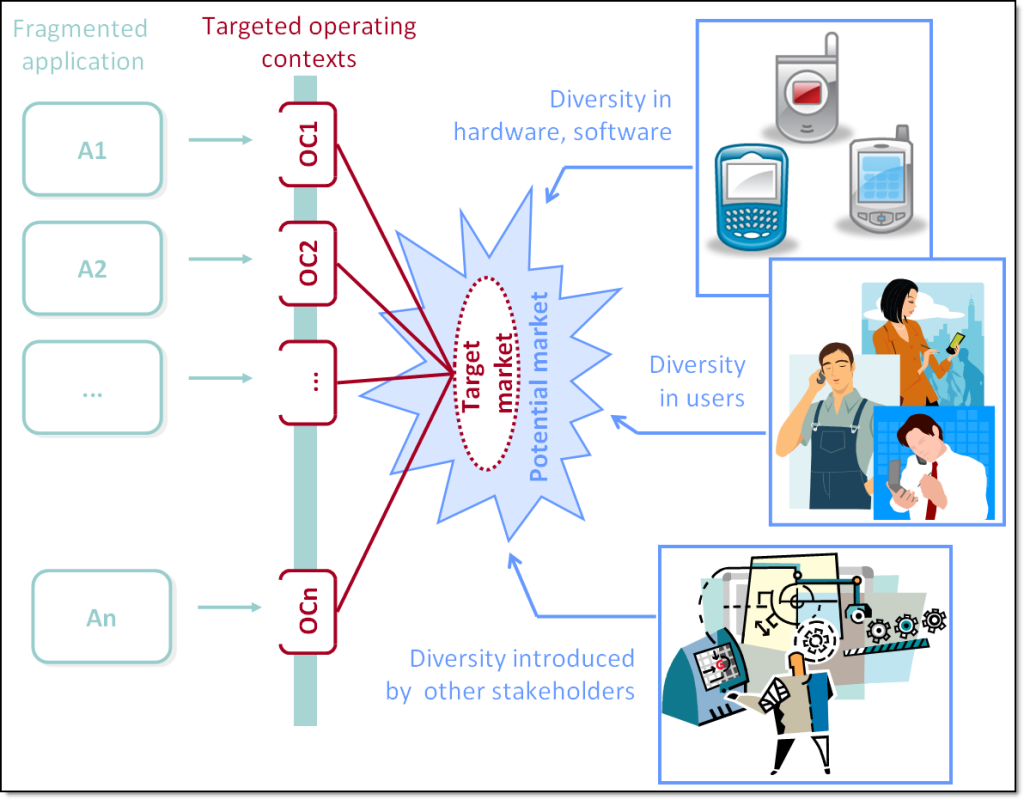
Jetpack ensures that apps work smoothly across different Android versions and devices. Developers can use modern features without worrying about compatibility issues on older devices.
7. Reduced Boilerplate Code

By handling repetitive tasks internally, Jetpack significantly reduces boilerplate code. This leads to cleaner, more concise codebases and improves developer productivity.
8. Strong Community and Official Support
Being officially supported by Google, Jetpack benefits from continuous updates, extensive documentation, and a large developer community. This makes it easier to find solutions, learn best practices, and stay updated with the latest trends.
The Main Components of Android Jetpack
Android Jetpack is organized into four major categories, each designed to address a specific aspect of Android app development. Together, these components simplify development, improve code quality, and help build scalable applications.
The four major categories are Architecture, UI, Behavior, and Foundation.
Architecture Components
Architecture components help developers design robust, maintainable, and scalable apps by following best practices.
Key elements include:
- ViewModel (manages UI-related data)
- LiveData (observable data holder)
- Room (database abstraction layer)
- Lifecycle (handles app lifecycle events)
ViewModel
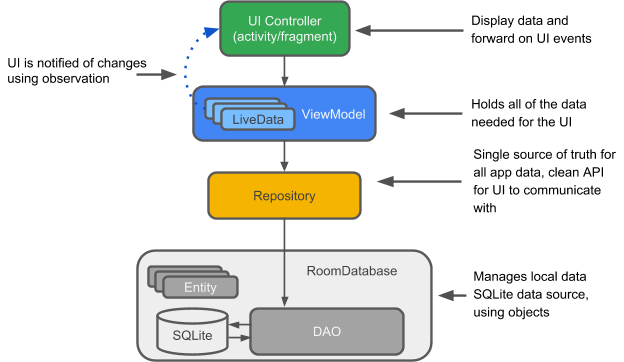
Stores and manages UI-related data in a lifecycle-conscious way. It survives configuration changes like screen rotations.
LiveData
An observable data holder that updates UI components automatically when data changes.
Room Database
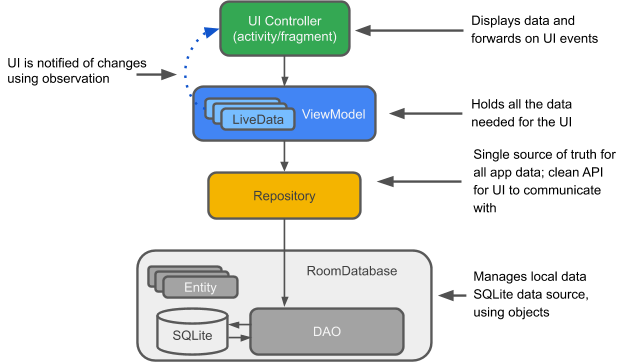
A powerful abstraction over SQLite that simplifies database operations and ensures compile-time checks.
Navigation Component
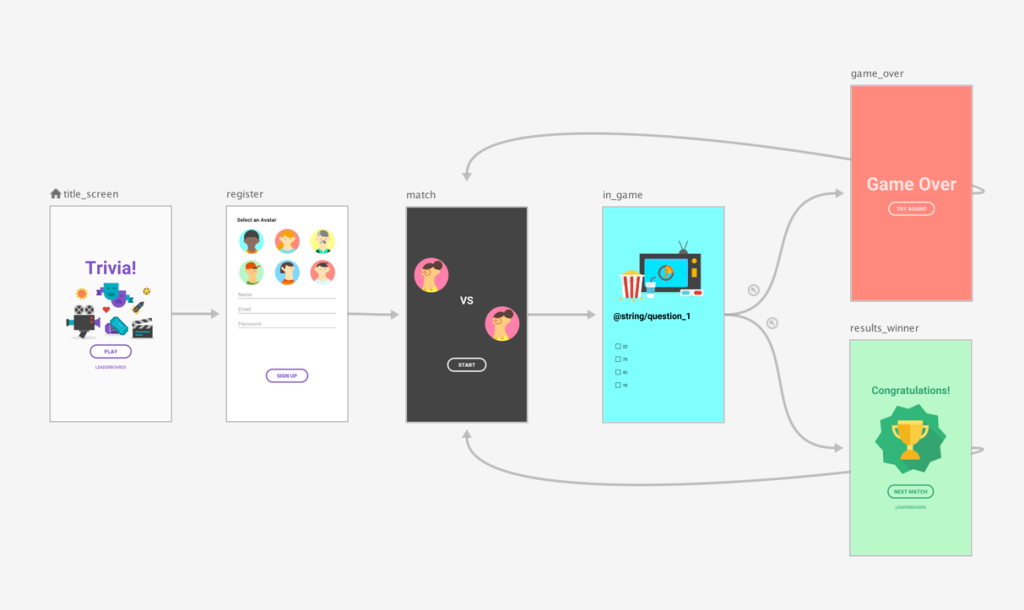
Handles app navigation, fragment transactions, and back-stack management efficiently.
UI Components
UI components help developers build beautiful, responsive, and user-friendly interfaces. These components help you design modern and responsive user interfaces.
Key elements include:
- Jetpack Compose (modern UI toolkit)
- RecyclerView (efficient list display)
- Layouts and Material Design components
Jetpack Compose
- A modern UI toolkit that simplifies UI development using declarative programming. Instead of XML, you build UI using Kotlin code.
Paging
- Efficiently loads large datasets in chunks, improving performance and user experience.
Fragment and Layout Components
- Simplify UI management and ensure compatibility across devices.
Behavior Components
Behavior components focus on how your app interacts with the Android system and user inputs. These components manage app behavior and background operations.
Key elements include:
- Navigation (manages in-app navigation)
- WorkManager (handles background tasks)
- Permissions (simplifies permission handling)
WorkManager
- Handles background tasks reliably, even if the app exits or the device restarts.
Lifecycle Awareness
- Ensures components respond correctly to lifecycle changes, reducing bugs and crashes.
Media and Download Manager
- Simplifies media playback and file downloading processes.
Foundation Components
Foundation components provide the core building blocks for Android apps. These components provide backward compatibility and essential system-levell support across different Android versions and devices.
Key elements include:
- AppCompat (for backward compatibility)
- Android KTX (Kotlin extensions for concise code)
- Multidex (for handling large apps)
AppCompat
- Ensures consistent UI across different Android versions.
Android KTX Extensions
- Kotlin extensions that make Android APIs more concise and expressive.
Multidex and Testing Tools
- Help manage large apps and improve testing capabilities.
How Android Jetpack Simplifies App Development
Android Jetpack is designed to remove much of the complexity traditionally associated with Android development. By offering a suite of pre-built, well-integrated tools, it allows developers to focus less on repetitive tasks and more on building meaningful features.
Android Jetpack significantly reduces development complexity by offering ready-to-use solutions for common challenges.
Instead of building everything from scratch, developers can rely on Jetpack components for:
- Lifecycle management
- Data persistence
- Navigation handling
- UI rendering
Android Jetpack simplifies app development by standardizing best practices, reducing complexity, and accelerating development workflows. It empowers developers to build high-quality, scalable, and maintainable applications without getting bogged down by low-level implementation details.
This results in faster development cycles, fewer bugs, and better app performance.
How to Start Using Android Jetpack in Your Projects
Getting started with Android Jetpack is straightforward, especially if you follow a structured approach. Whether you’re building a new app or upgrading an existing one, Jetpack helps you adopt modern Android development practices with ease.
- Installation
- Install the latest version of Android Studio
- Enable Jetpack libraries in your project dependencies
- Start with core components like ViewModel and LiveData
- Gradually integrate advanced components like Room and Navigation
- Explore Jetpack Compose for modern UI development
- Create a New Project (or Update an Existing One)
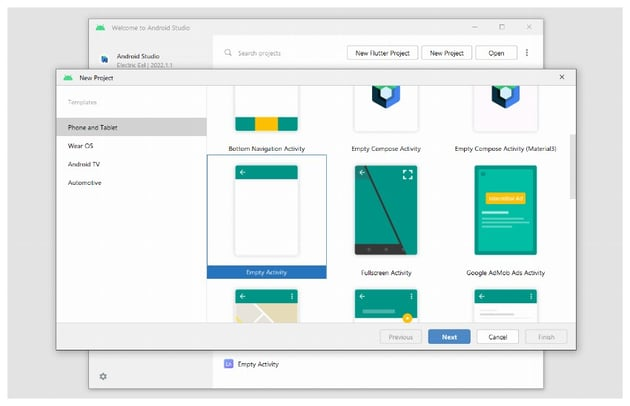
When creating a new project, choose a modern template like Empty Activity with Jetpack Compose.
For existing projects, you can gradually introduce Jetpack components without rewriting everything.
Jetpack is modular, you can adopt it step by step.
- Add Jetpack Dependencies
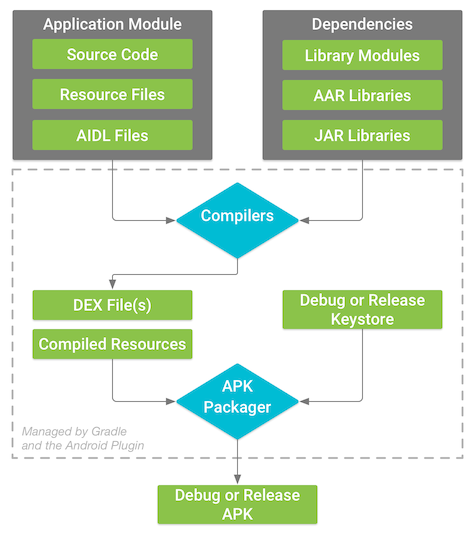
To start using specific Jetpack components, include them in your build.gradle file.
Example:
dependencies {
implementation “androidx.lifecycle:lifecycle-viewmodel-ktx:2.x.x”
implementation “androidx.navigation:navigation-fragment-ktx:2.x.x”
implementation “androidx.room:room-runtime:2.x.x”
}
- Start with Architecture Components
Begin by integrating core architecture components:
- ViewModel → Manage UI-related data
- LiveData → Observe data changes
- Room → Handle local database
- Implement Navigation
Use the Navigation component to manage screen transitions and user flow. It simplifies fragment transactions and ensures consistent navigation behavior across your app.
- Build UI with Jetpack Compose
Jetpack Compose allows you to design modern, dynamic interfaces with less code.
- Use composable functions to build UI
- Preview layouts in real time
- Create reusable UI components
- Handle Background Tasks Efficiently
Use WorkManager for tasks like:
- Data syncing
- Notifications
- Periodic background jobs
- Test and Optimize Your App
- Use built-in testing tools in Android Studio
- Monitor performance with profilers
- Debug lifecycle and UI behavior
At last,
Android Jetpack has become the foundation of modern Android development. By offering a robust set of tools and architecture components, it helps developers build apps that are scalable, maintainable, and future-ready.
Whether you’re just starting out or looking to upgrade your development approach, adopting Android Jetpack will significantly improve both your productivity and the quality of your applications.
Best Practices for Using Android Jetpack
- Follow MVVM architecture for better separation of concerns
- Use ViewModel to manage UI data
- Avoid storing UI logic in Activities
- Prefer Kotlin for cleaner and more concise code
- Keep components modular and reusable
Common Mistakes Developers Make with Jetpack
- Overusing components without understanding their purpose
- Mixing old architecture patterns with Jetpack
- Ignoring lifecycle awareness
- Not handling background tasks properly
- Poor state management in Jetpack Compose
Frequently Asked Questions
Is Android Jetpack the same as Jetpack Compose?
No. Jetpack Compose is just one UI toolkit within Android Jetpack. Jetpack itself is a broader suite of tools and libraries.
What problems does Android Jetpack solve?
It solves issues like lifecycle management, boilerplate code, navigation complexity, and data handling.
Do all Android apps need Jetpack?
While not mandatory, Jetpack is highly recommended for modern Android development due to its efficiency and scalability.
Is Android Jetpack beginner-friendly?
Yes. Jetpack provides structured guidance and ready-to-use components, making it easier for beginners to learn Android development.